Repository
https://github.com/quochuy/steemedphish
New features since v0.0.30
Make comment blocks more visible as a work around the new strategy described here https://steemit.com/steemit/@arcange/be-careful-new-scam-for-phishing-website-uses-fake-comments-with-images. Comments blocks will show a dotted left border in grey, if the grey border does not stop, this means you are still in the same comment.

When hovering the mouse on an image, show a dotted border to help spot fake upvote/reply links. In the mock below, you can see that "mattclarke" and the "upvote/reply/edit" are fakes as they respond to mouse hovering by showing a dotted border:

Add support for steemcleaners steemit account blacklist https://github.com/gryter/plentyofphish/blob/master/phishing.txt and mark those authors if found on any steemit blogs

GitHub Account
Paste here the full url to your GitHub account. E.g. https://github.com/quochuy/
Download the extension
https://chrome.google.com/webstore/detail/steemed-phish/eiaigalhddmmpdnehcigmlmgllomljgj
What is Steemed Phish?

Steemed Phish is a Chrome extension that offers protection against Steemit.com phishing clones
Features
Changing icon color based on white/blacklist
This extension will validate Steemit related websites by changing its icon color:
- red is for blacklisted sites
- green is for recognised friendly sites
- grey is for unrecognised sites
Whitelist and blacklist
Steemed Phish does not rely solely on these list as anything not listed won't be protected. Blacklist and whitelist are hard to maintain but adding them helps widening the protection coverage.
When a site is neither whitelisted or blacklisted, Steemed Phish will try to check the URL structure to find known patterns and flag a link as supsicious by coloring it in pink.
There are currently 19 blacklisted websites and 31 whitelisted websites.
Phishing Alerts
If a user lands on a phishing website, Steemed Phish will display two types of alerts:
- a dialog that shows up even if the page was loaded in a tab in the background
- a full page alert, that covers the whole phishing page and offers a link to go back to Steemit.com. The full page alert also reminds the user of not using their Steemit Keys on unknown websites and keep their password (Owner Key) safe.
Expand shorten URL
Some links are shortened using services such as bit.ly, this prevents people from easily analysing the URL of the link. Steemed Phish uses a link expanding API to determine the destination URL of a link and then compare it again against the white/blacklist logic above.

Making external links more visible
Ideally, a user should be more careful on links they are clicking on by always paying attention to the URL of an anchor. But this is easier said than done and even the most experienced user can let down their guard sometimes and get tricked by the scammers.
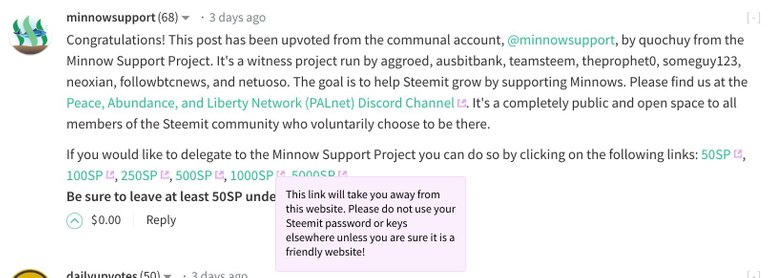
Recently, Steemit.com, has added a feature that marks external links with a grey icon on the right of each links. Steemed Phish will make that icon more obvious by coloring it in purple. On top of that, it will make a bubble appear next to the mouse cursor with a text explaining the fact that clicking on the link with leads you away so don't use your password. This bubble won't show up on friendly (whitelisted) websites
Support lazy loading
The extension works even if the links are inserted into the page after page load (Ajax), for example:
- The link was in a comment that was hidden due to low rating and I then revealed it.
- The link is in a comment low in a popular page. The comment was not loaded at first but only when you scroll down
In both cases, the first time the page loads, the comment and the link is not loaded and displayed. Steemed Phish still works in these cases.
Download the extension
https://chrome.google.com/webstore/detail/steemed-phish/eiaigalhddmmpdnehcigmlmgllomljgj
Thanks for the contribution, @quochuy!
It's a cool little feature you've added! I never knew they actually started adding images to their posts in an attempt to scam people, that's so sad. A couple of suggestions regarding your code:
Great job on helping prevent people get scammed - keep up the good work!
Your contribution has been evaluated according to Utopian policies and guidelines, as well as a predefined set of questions pertaining to the category.
To view those questions and the relevant answers related to your post, click here.
Need help? Write a ticket on https://support.utopian.io/.
Chat with us on Discord.
[utopian-moderator]
Thanks for all @amobastian
Will try to do that from now on.
Thank you for your review, @amosbastian!
So far this week you've reviewed 1 contributions. Keep up the good work!
This post has been just added as new item to timeline of Steemed Phish Extension on Steem Projects.
If you want to be notified about new updates from this project, register on Steem Projects and add Steemed Phish Extension to your favorite projects.
Hey @quochuy
Thanks for contributing on Utopian.
We’re already looking forward to your next contribution!
Want to chat? Join us on Discord https://discord.gg/h52nFrV.
Vote for Utopian Witness!