Rising Star ဂိမ်းရဲ့ "Manage Your Band" ရဲ့ featureက ကိုယ့်ရဲ့ Band (တီးဝိုင်း) ကို စိတ်ကြိုက်ပြင်ဆင်တာ၊ အဖွဲ့ဝင်တွေ ခန့်အပ်တာနဲ့ အမှတ်တွေ (Ranking points) ပိုရအောင် စီမံရတဲ့ နေရာဖြစ်ပါတယ်။
The "Manage Your Band" feature in the Rising Star game is where you can customize your band, appoint members, and manage them to earn more ranking points.
ဒီနေ့တော့ ကျမရဲ့ Bandကို စိတ်ကြိုက်ပြန်လည် ပြင်ဆင်ထားပါတယ်။ ကျမ လုပ်ဆောင်ခဲ့ပုံအဆင့်ဆင့်ကို မိတ်ဆွေတို့အတွက် ဗဟုသုတတိုးပွားအောင် ပြန်လည်မျှဝေလိုက်ပါတယ်။
Today, I have customized my band. I’m sharing the steps I took to help increase your knowledge.

ပထမဆုံးအနေနဲ့ Band Member များ ခန့်အပ်ခြင်း (Slot စီမံခြင်း)ကို လုပ်ဆောင်ပါတယ်။ အပေါ်ဆုံးမှာ Slot လေးတွေ တွေ့ရပါလိမ့်မယ်။ အဲဒီနေရာမှာ ကိုယ်ပိုင်ဆိုင်ထားတဲ့ People Cards (လူကတ်များ) နဲ့ Instrument Cards (တူရိယာကတ်များ) ကို ထည့်သွင်းရတာပါ။
First, I managed the band member appointments (Slot management). You will see slots at the top. This is where you insert the People Cards and Instrument Cards that you own.
ကိုယ့်တီးဝိုင်းမှာ ပါဝင်မယ့် အဆိုတော် ဒါမှမဟုတ် ဂီတပညာရှင်တွေကို ရွေးချယ်နိုင်ပါတယ်။ ကျမကတော့ အသစ်ဝယ်ယူထားတဲ့ Gav ကို အဲဒီ Slot ထဲမှာ ခေါင်းဆောင်အဖြစ် ထည့်လိုက်ပါတယ်။ အဲ့ဒီလိုထည့်လိုက်ခြင်းအားဖြင့် Ranking အတွက် အမှတ်ပိုရစေပါတယ်။

You can choose the singers or musicians who will be in your band. I placed my newly purchased "Gav" card in that slot as the leader. Doing this helps gain more points for the ranking.
ကိုယ့်ရဲ့ တီးဝိုင်းအမျိုးအစားပေါ် မူတည်ပြီး လိုအပ်တဲ့ တူရိယာတွေကို တပ်ဆင်ပါမယ်။
I equipped the necessary instruments depending on the type of my band.
ပုံရဲ့ အလယ်ပိုင်းမှာ တွေ့ရတဲ့ Rows တွေကတော့ ကိုယ်ထုတ်လုပ်ထားတဲ့ သီချင်းတွေ (Tracks) အတွက် Band formation တွေကို သိမ်းထားတာပါ။
The rows you see in the middle of the image are for saving band formations for the tracks you have produced.
Loadကတော့ အရင်က သိမ်းထားတဲ့ Band formation ကို ပြန်ခေါ်တာပါ။
"Load" is to recall a previously saved band formation.
Save: အခုလက်ရှိ ပြင်ဆင်ထားတဲ့ လူစာရင်းနဲ့ တူရိယာတွေကို သိမ်းဆည်းတာပါ။
"Save" is to save the current lineup of members and instruments you have prepared.
Delete: အဲဒီ track အတွက် သိမ်းထားတဲ့ setting ကို ဖျက်လိုက်တာပါ။
"Delete" is to delete the settings saved for that specific track.
Ranking Points: ဒီနေရာမှာ ကတ်တွေကို မှန်ကန်စွာ နေရာချထားခြင်းဖြင့် Leaderboard Ranking မှာ အမှတ်တွေ ပိုရလာပါလိမ့်မယ်။
Ranking Points: By placing the cards correctly in this area, you will earn more points in the Leaderboard Ranking.
ကိုယ့်တီးဝိုင်းမှာ ဘယ်သူတွေ ပါဝင်တယ်ဆိုတာကို စိတ်ကြိုက် ပြင်ဆင်နိုင်တဲ့အတွက် ဂိမ်းကစားရတာ ပိုပြီး ပီပြင်စေပါတယ်။
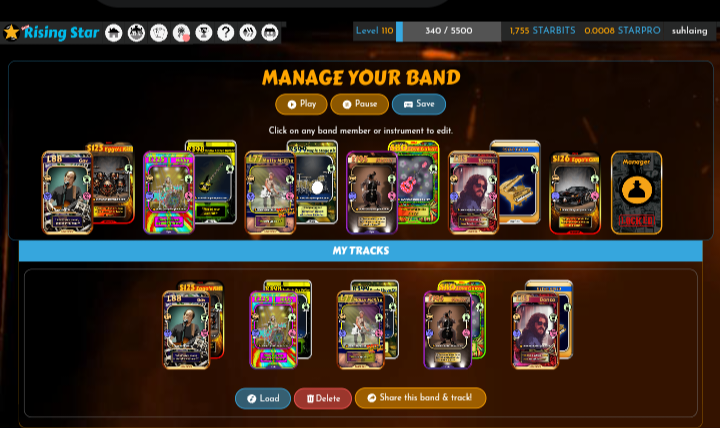
Being able to customize who is in your band makes the gameplay much more realistic.
"Share this band & track!" ဆိုတဲ့ ခလုတ်လေးကို သုံးပြီး ကိုယ့်တီးဝိုင်းရဲ့ ပုံစံကို တခြားသူတွေကို ကြွားလို့လည်း ရပါတယ်ရှင်။
You can also use the "Share this band & track!" button to show off your band formation to others.
ကိုယ့်ရဲ့ Band Member တွေကိုစိတ်ကြိုက်ပြင်ဆင်ထားပြီးရင် "Save" လုပ်ထားရပါမယ်။
Once you have customized your band members, you must click "Save."

အခုလို Band Memberတွေကို update လုပ်ပြီးတဲ့ နောက်မှာ ကျမရဲ့ Rank တက်လာပါတယ်။ အရင်က Rank 253ကနေ အခုတော့ 238အထိ တိုးတက်လာတာ တွေ့ရပါတယ်။
After updating the band members like this, my rank increased. I saw it improve from Rank 253 to Rank 238.
အခုမှ Risingstar Gameကို စတင်ကစားသူတွေအတွက် Risingstarမှာ ထိပ်တန်းနေရာကို တက်လှမ်းဖို့အတွက် တစ်နေ့တာ Mission တွေကို ပုံမှန်လေး လုပ်ပေးပါ။ Mission များလေလေ Ranking အတွက် လိုအပ်တဲ့ အမှတ်တွေ ပိုရလေလေပါပဲ။

For those just starting the Rising Star game, please do your daily missions regularly to climb to the top. The more missions you complete, the more points you get for the ranking.
အမြဲတမ်း Ego ကို 0% မှာပဲ ရှိနေအောင် ဂရုစိုက်ပါ။ Ego တက်လာရင် ရမယ့် Starbits နည်းသွားရုံတင်မကဘဲ Ranking ပေါ်မှာလည်း သက်ရောက်မှု ရှိနိုင်လို့ပါ။
Always make sure to keep your Ego at 0%. If your Ego rises, not only will the Starbits you earn decrease, but it can also affect your ranking.
Gav လို ရှားပါးတဲ့ Legendary ကတ်တွေကို စုဆောင်းတာက Ranking တက်ဖို့အတွက် အမြန်ဆုံး လမ်းကြောင်းပါပဲ။

Collecting rare Legendary cards like "Gav" is the fastest way to increase your ranking.
Level တက်လာတာနဲ့အမျှ Buskeria မြေပုံ (သို့မဟုတ်) တခြား Zone တွေမှာ Reward ပိုများတဲ့ Mission အသစ်တွေကို လုပ်ဆောင်ခွင့် ရလာနိုင်ပါတယ်။ အထူးသဖြင့် Starbits ပိုရမယ့် Mission တွေကို စောင့်ကြည့်ပေးပါ။
As you level up, you will get the chance to perform new missions with higher rewards on the Buskeria map or other zones. Keep an eye out for missions that give more Starbits.
ကျမက Level ၁၁၀ကိုလည်း ရောက်ရှိလာပြီဖြစ်တဲ့ အတွက် Mission လုပ်ရတာ ပိုသွက်လာသလို XP ရရှိမှုနှုန်းကလည်း ပြောင်းလဲလာပါတယ်။

Since I have reached Level 110, performing missions has become smoother, and the XP gain rate has also changed.
ဒါကြောင့် အခုကစပြီး Country Tour မှာ Level 125 နဲ့ အထက်တွေကိုသာ ကစားခွင့်ရနေတဲ့ (၁) Country Festival Auditions Mission၊ (၂) Country Festival Gig Mission၊ (၃) Country Tour Manager Interview Mission တွေကို ဆက်လက်လုပ်ဆောင်ဖို့ Goal ချမှတ်ထားပါတယ်။
Therefore, from now on, I have set a goal to continue with the missions that require Level 125 and above in the Country Tour: (1) Country Festival Auditions Mission, (2) Country Festival Gig Mission, and (3) Country Tour Manager Interview Mission.

မိတ်ဆွေတို့ကော ဘယ် Level ကို ရောက်ရှိနေကြ ပြီလည်း။ မျှဝေပေးသွားကြပါအုံး။
What level have you reached, friends? Please share with me!



Curated!