BED LEVELLING
One of the most important settings is the perfect distance between print nozzle and print bed. If the first layer is not perfectly melted onto the print bed, the print object will not adhere and will tip over during printing or the adhesion is too strong. In this case, the object may then not be able to be removed from the print bed after printing without being destroyed. Depending on the filament used, even damage to the print bed cannot be ruled out. The print nozzle could scratch the print bed if it is much too deep, or rather the bed is too high.
Eine der wichtigsten Einstellungen ist der perfekte Abstand zwischen Druckdüse und Druckbett. Wenn der erste Layer nicht perfekt auf das Druckbett geschmolzen wird, haftet das Druckobjekt nicht und kippt während des Druckes um oder die Haftung ist zu stark. In diesem Fall lässt sich das Objekt nach dem Druck dann unter Umständen nicht zerstörungsfrei vom Druckbett lösen. Je nach verwendetem Filament sind sogar Beschädigungen des Druckbettes nicht ausgeschlossen. Die Druckdüse könnte das Druckbett zerkratzen wenn diese viel zu tief ist, oder besser gesagt das Bett zu hoch ist.

I replaced the rickety springs that were originally fitted to the adjusting screws with silicone buffers. These have the advantage that the bed no longer adjusts. With the springs, the print bed moves after a few hours of printing.
Die klapprigen Federn, die original an den Einstellschrauben verbaut waren, habe ich durch Silikonpuffer ersetzt. Diese haben den Vorteil, dass sich das Bett nicht mehr verstellt. Bei den Federn verstellt sich das Druckbett nach einigen Druckstunden.

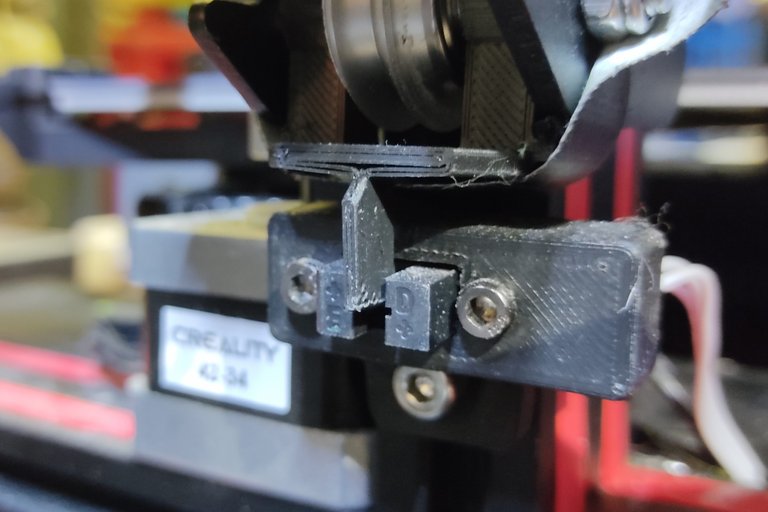
First, adjust the print bed so that the silicone buffers are slightly under tension. If this is too loose, the height of the bed may change during printing. For this it may be necessary to adjust the height of the limit switch for the Z-axis.
Zuerst sollte man das Druckbett so einstellen, dass die Silikonpuffer etwas unter Spannung sind. Wenn das zu locker ist, verändert sich die Höhe des Bettes während des Druckens unter Umständen. Dafür kann es notwendig sein, die Höhe des Endschalters für die Z-Achse zu verstellen.
The next step is to adjust the distance between the print nozzle and the print bed. As this has to fit in the operating condition, heat the print bed to 50 to 60°C and the print nozzle to 200 to 220 "C. Then move to the front left corner and adjust the distance with the help of a piece of paper. It should be easy to pull the paper but it should not be possible to push it against the nozzle. Then move to the back right, front right, back right and then to the centre. To be on the safe side, you can then move all the positions clockwise again.
Im nächsten Schritt wird der Abstand zwischen Druckdüse und Druckbett eingestellt. Da das im Betriebszustand passen muss heizt man das Druckbett auf 50 bis 60°C und die Druckdüse auf 200 bis 220"C auf. Dann fährt man zuerst an die vordere linke Ecke und stellt mit Hilfe eines Stückes Papier den Abstand ein. Das Papier sollte sich zwar leicht ziehen lassen aber nicht gegen die Düse schieben lassen. Danach fährt man nach hinten rechts, vorne rechts, hinten rechts und dann in die Mitte. Zur Sicherheit kann man dann alle Positionen nochmal im Uhrzeigersinn abfahren.

The best way to move to the positions is via the display. This is possible with the help of an alternative firmware. I have installed the Jyers firmware on the Ender 3.
Die Positionen fährt man am besten über das Display an. Mithilfe einer alternativen Firmware ist das möglich. Ich habe die Jyers Frimware auf den Ender 3 gespielt.

In the second step, you print a test object to check whether the distance between the print nozzle and the print bed fits at all points. It is best to use a filament with a large contrast to the print bed. You should print the test object slowly, check it permanently and turn the adjustment screws during printing if necessary.
Im zweiten Schritt druckt man ein Testobjekt um zu kontrollieren, ob der Abstand zwischen Druckdüse und Druckbett an allen Stellen passt. Am besten verwendet man ein Filament mit großem Kontrast zum Druckbett. Man sollte das Testobjekt langsam drucken, permanent kontrollieren und während des Druckes gegebenenfalls an den Einstellschrauben drehen.

There is too much space at the front right corner. The filament does not adhere to the print bed.
An der vorderen rechten Ecke ist der Abstand zu groß. Das Filament haftet nicht auf dem Druckbett.

At this point the distance fits. The 3 lines printed next to each other are perfectly merged. The only thing that doesn't fit here is the material flow. More about that below.
An dieser Stelle passt der Abstand. Die 3 Linien, die nebeneinander gedruckt wurden sind perfekt miteinander verschmolzen. Das Einzige, was hier nicht passt, ist der Materialfluss. Dazu weiter unten mehr.

After the print bed has cooled down, it should be easy to detach the object from the print bed in one piece without tools.
Nach dem Abkühlen des Druckbettes sollte sich das Objekt einfach und ohne Werkzeug in einem Stück vom Druckbett lösen lassen.

The underside should be smooth and even.
Die Unterseite sollte glatt und gleichmäßig sein.

MESH

Ideally, the print bed is absolutely flat and straight. If there are small unevennesses despite careful levelling, it helps to create a mesh. To do this, the distance between the nozzle and the print bed is measured on a grid (5x5, 6x6...) via the firmware and then corrected by software. The created mesh is stored in the printer's memory and activated. With each print, the height is adjusted accordingly at the various points. The nozzle is moved up and down while the first layer is printed. This ensures that the material adheres well at every point. A mesh should only be created and used if it is really necessary. I personally don't think much of automatic mesh systems that create a new mesh before each print. In most cases this would not be necessary. Most of the time, printing works without a mesh, if you have levelled up properly. Especially with small parts, the printing time is considerably longer.
Im Idealfall ist das Druckbett absolut plan und gerade. Sollte es trotz sorgfältigem Leveln kleine Unebenheiten geben hilft das Erstellen eines Meshs. Dazu wird über die Firmware der Abstand zwischen Düse und Druckbett an einem Raster (5x5, 6x6...) gemessen und dann per Software korrigiert. Das erstellte Mesh wird im Speicher des Druckers hinterlegt und aktiviert. Bei jedem Druck wird die Höhe an den verschiedenen Stellen entsprechend angepasst. Die Düse wird also während der erste Layer gedruckt wird hoch und runter bewegt. Dadurch wird sicher gestellt, dass das Material an jeder Stelle gut haftet. Ein Mesh sollte man nur erstellen und verwenden wenn dies wirklich notwendig ist. Von automatischen Mesh Systemen, die vor jedem Druck ein neues Mesh erstellen halte ich persönlich gar nichts. In den allermeisten Fällen wäre dies nicht nötig. Meist funktioniert der Druck auch ohne Mesh, wenn man denn sauber gelevelt hat. Gerade bei kleinen Teilen verlängert sich die Druckzeit dadurch erheblich.
FLOW
As already mentioned above, the material flow also has an influence on the adhesion to the print bed, and of course on the dimensional accuracy of the printed object. If too much material is extruded, it will look like the picture above. If too little material is extruded, the adhesion may be too low. The flow depends on the filament. If the filament is not exactly 1.75mm (average per metre), the amount that comes out of the print nozzle is not correct.
Wie bereits weiter oben erwähnt, hat der Materialfluss ebenfalls Einfluss auf die Haftung auf dem Druckbett, sowie natürlich auf die Maßhaltigkeit des gedruckten Objektes. Wird zuviel Material extrudiert sieht das dann so aus wie im Bild oben. Wenn zu wenig Material extrudiert wird ist die Haftung unter Umständen zu gering. Abhängig ist der Fluss vom Filament. Wenn das Filament nicht ganz genau 1,75mm (Durchschnitt pro Meter) ist, stimmt eben die Menge, die dann an der Druckdüse austritt nicht.

To adjust the flow as precisely as possible, print test objects like the ones in the picture above. Create several files of the same model with different flows. Start from 100% and go up and down in steps of 2 to 3%.
The parts must fit into each other after printing. You can also check the dimensions with a caliper gauge. On the left, the flow is too high. The parts do not fit into each other. You can see bulges at the edges. The excess material has to go somewhere. You can also see the over-extrusion on the surface. It is wavy and not smooth and even.
On the right of the picture, the material flow is too low. The layers are not fused together in some places. Such an object is therefore hardly mechanically resilient. There are gaps in the surface.
The black parts in the middle are almost perfect.
Um den Flow möglichst präzise einzustellen druckt man Testobjekte, wie die im Bild oben. Man erstellt mehrere Dateien des gleichen Models mit unterschiedlichem Flow. Ausgehend von 100% in Schritten von 2 bis 3% nach oben und unten.
Die Teile müssen nach dem Druck ineinander passen. Mit einem Messchieber kontrolliert man zusätzlich die Maße. Links ist der Flow zu hoch. Die Teile passen nicht ineinander. An den Kanten sieht man Ausbeulungen. Das überschüssige Materal muss ja schließlich irgendwo hin. Auch an der Oberfläche erkennt man die Überextrusion. Diese ist wellig und nicht glatt und eben.
Rechts im Bild ist der Materialfluss zu gering. Die Layer sind an einigen Stellen nicht miteinander verschmolzen. Ein solches Objekt ist somit mechanisch kaum belastbar. In der Oberfläche sind Lücken zu sehen.
Die schwarzen Teile in der Mitte sind nahezu perfekt.
WHAT IS LIGHT PAINTING?

LICHTKUNSTFOTO
If you like my art visit www.lichtkunstfoto.de for more Light Art Photography and informations about Light Painting. Join me on Flickr Twitter

For more great Light Art Photography, Light Painting and inspiration check these light painters: @marlasinger666 @fadetoblack @fastchrisuk @dawnoner @oddballgraphics @martbarras @stepko @rod.evans.visual @yo-hoho @maxpateau @gunnarheilmann @neilru75 @maximepateau @ryuslightworks @lightstabeu @candelart @lacelight

WE ARE LIGHT PAINTERS

To help and support the LightPainters community here on Hive I would appreciate your delegation of HivePower. Any amount is appreciated. It does not require much to get started, we are happy for any gesture. @lightpainters
How to delegate?
Delegate 50HivePower, [50HP]
Delegate 250HivePower, [250HP]
Delegate 500HivePower, [500HP]
Delegate 1000HivePower, [1000HP]
All the Hive Power will help to upvote the artist's contribution as part of the LightPainters community.
Thank you for sharing this post on HIVE!
Your content got selected by our fellow curator tibfox & you just received a little thank you upvote from us for your great work! Your post will be featured in one of our recurring compilations which are aiming to offer you a stage to widen your audience within the DIY scene of Hive. Stay creative & HIVE ON!
Please vote for our hive witness <3
Dear @lichtkunstfoto,
Our previous proposal expired end of December and the Hivebuzz project is not funded anymore. May we ask you to review and support our new proposal (https://peakd.com/me/proposals/248)?
Thank you for your help!