As promised a follow up on the Internet of Things for beginners (working with cloud service to build your own applications) how to monitor your home during the December holidays from anywhere in the world.

Image credit
Before you can attempt to build this project I will suggest you go through my tutorials first to understand the basics.
My Arduino fun projects tutorials:
- My Arduino fun projects: Part1 (UPDATED: with full code and schematics): Electricity data logging system
- My Arduino fun projects: Part2: (UPDATED: with full code and schematics): Fingerprint scanner for exam room
- My Arduino fun projects: Part3: (full code and schematics): Be in control, forget the remote and use your smart phone
- My Arduino fun projects: Part4: SMS controlled devices (e.g. lights)
- My Arduino fun projects: Part5: Arduino based Bitcoin vending machine
Mobile App development tutorials:
- Building a simple android app (no prior programming knowledge needed) – Shake and Speak
- Building advanced android app (no prior programming knowledge needed) – GPS tracking/navigator app
I will breakdown the project into fewer parts and conclude by combining all the parts as a final design.
Parts to be discussed:
Features and operation:
- Prototype is built around an Arduino YUN (AVR microcontroller with LINUX) which is connected to the internet (via a 3G dongle, can also be connected via Wifi and Ethernet) to Dweet cloud server or even Pubnub, ThingSpeak and many more clouds.
- Android phone application which monitors Dweet cloud server for changes from PIR motion sensor.
- Android phone application (developed using MIT App inventor 2) also monitors Smoke or Flame detector
- Soil moisture sensor to measure soil moisture levels and also sent to Freeboard dashboard for monitoring.
- Two relays which are available to connect a pump or lights even a geyser.
Arduino YUN
Arduino YUN can be very difficult to work with as it also includes Linux...navigating between the Arduino and Linux for beginner can be tricky.

Here is a full detailed tutorial on working with Arduino YUN go to Example 5: Use the 3G dongle and simply follow the steps, I used the HuaWei E303 which most of our USB 3G dongles are of the same brand most companies simply change the branding outside.
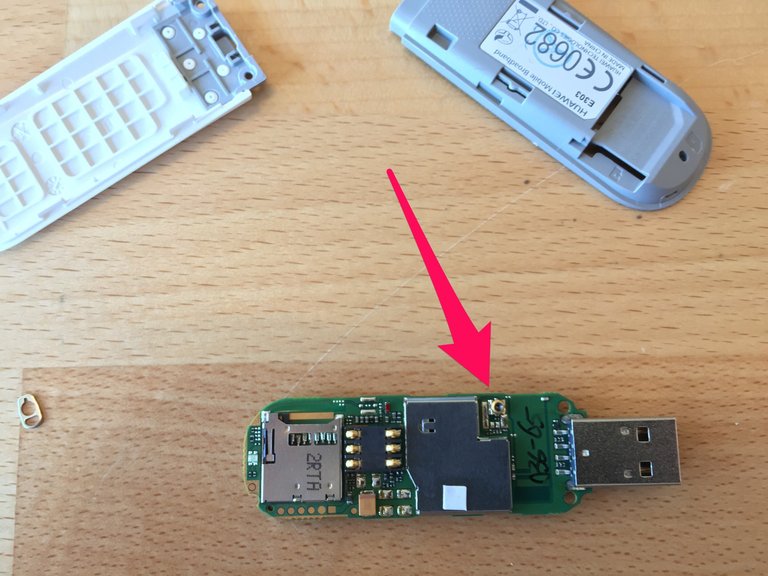
Image credit
Packages are installed using the command line over ssh using putty into the Linux side.
root@Arduino:~# opkg update
root@Arduino:~# opkg install luci-proto-3g
root@Arduino:~# opkg install kmod-usb-serial-option kmod-usb-serial-wwan luci-proto-3g usb-modeswitch-data usb-modeswitch
Else you can connect to your wifi at home simply go to CONFIGURE YUN SHIELD
Note that this a shield for a YUN but the methods are still the same...I find it easy to follow their tutorials unlike the forum.
Motion detector (PIR)

Sketch to test for motion and switching on an LED connected to pin 13
*/
PIR sketch
a Passive Infrared motion sensor connected to pin 2
lights the LED on pin 13 if Motion be on for 1 sec
*/
const int ledPin = 13; // choose the pin for the LED
const int PIR = 2; // choose the input pin (for the PIR sensor)
void setup() {
pinMode(ledPin, OUTPUT); // declare LED as output
pinMode(PIR, INPUT); // declare pushbutton as input
}
void loop(){
int val = digitalRead(PIR); // read input value
if (val == HIGH)                  // check if the input is HIGH
{
digitalWrite(ledPin, HIGH); // turn LED on if motion detected
Serial.println("motion detected");
delay(1000);
digitalWrite(ledPin, LOW); // turn LED off
Serial.println("No motion");
}
}
Smoke or Flame detector

The analog gas sensor - MQ2 is used in gas leakage detecting equipments in consumer and industry markets, this sensor is suitable for detecting LPG, i-butane, propane, methane ,alcohol, Hydrogen, smoke.It has a high sensitivity and fast response time.And the sensitivity can be adjusted by the potentiometer.
Source
Sketch to test for Smoke or Flame detector
void setup()
{
  Serial.begin(9600); //Set serial baud rate to 9600 bps
}
void loop()
{
int val;
val=analogRead(0);//Read Gas value from analog 0
Serial.println(val,DEC);//Print the value to serial port
delay(100);
}
Then decide on the trigger value.
Soil moisture sensor
 |
| 
This sensor uses the two probes to pass current through the soil, and then it reads that resistance to get the moisture level. More water makes the soil conduct electricity more easily (less resistance), while dry soil conducts electricity poorly (more resistance). It will be helpful to remind you to water your indoor plants or to monitor the soil moisture in your garden.
Sketch to test for soil moisture
/*
  # the sensor value description
  # 0  ~300     in water
  # 300~700     humid soil
  # 700~950     dry soil (870 start watering...air 1023)
*/
int PumpPin = A12;    // Pump relay connected to analogue pin A12
int Soilsensorpin = A0;
void setup(){

  Serial.begin(9600);
   pinMode(PumpPin, OUTPUT);
}

void loop(){
  Serial.print("Moisture Sensor Value:");
  int soilValue = analogRead(Soilsensorpin);
  Serial.println(soilValue);
  delay(1000);

    if (soilValue < 400) {
     //Start watering
    digitalWrite(PumpPin, HIGH);
    Serial.println("STOPPED Watering");
  }
  else {
    //Stop watering
    digitalWrite(PumpPin, LOW);
    Serial.println("Watering");
  }
}
Note: A0 is connected to Arduino analogue pin A0 and VCC is 3.3V or 5V for now its connected to 3.3V. D0 is not connected.
Relays
Discussed them on My Arduino fun projects: Part4: SMS controlled devices (e.g. lights)
Final design
| Hardware | Mobile App |
|---|---|
 |  |
Mobile App code:


Arduino Sketch:
#include <Bridge.h>
#include <HttpClient.h>
String inData;
int PIRenable = 1; //1=Enble and 0=Disable
const int PIR = 8; // choose the input pin (for the PIR sensor) digital 8
int PIRstatus = LOW; //start with no motion...High means motion detected
const int Firesensor = A1; // choose the input pin (for the PIR sensor) digital 8
int Firestatus = 800; //start with >600 no fire...<600 means fire/smoke detected
const int Soilsensorpin = A0;
const int buzzer = 12; //Buzzer pin
const int Relay1 = 2;
const int Relay2 = 3;
int Sendingonce = 1; //1=Enble and 0=Disable
int Wateringonce = 1; //1=Enble and 0=Disable
int buzzeroff = 1;
void setup() {
  // Bridge takes about two seconds to start up
  // it can be helpful to use the on-board LED
  // as an indicator for when it has initialized
  pinMode(Relay1, OUTPUT);
  pinMode(Relay2, OUTPUT);
  digitalWrite(Relay1, HIGH);
  digitalWrite(Relay2, HIGH);
   pinMode(PIR, INPUT); // declare PIR as input
   pinMode(Firesensor, INPUT); // declare Firesensor as input
   pinMode(Soilsensorpin, INPUT); // declare Firesensor as input
   pinMode(buzzer, OUTPUT);
  Bridge.begin();
  //digitalWrite(13, HIGH);

  Serial.begin(9600);
}
void loop() {
  // Initialize the client library
  HttpClient client;
  //readcloud();
  //************PIR post to dweet cloud************************
  PIRstatus = digitalRead(PIR);
  if (PIRstatus == HIGH) // check PIR
{
  Serial.println("motion detected");
  Sendingonce = 1;
  String temp = "http://dweet.io/dweet/for/Mokluc?Temp=5";// sending a single value to Dweet.io
  //Make a HTTP request:
 client.get(temp);
 Serial.println(temp);
 if (buzzeroff == 1){
   digitalWrite(buzzer, HIGH);
 delay(500);
 }
}
if (Sendingonce == 1){
  Sendingonce = 0;
if (PIRstatus == LOW){
Serial.println("NO motion");
  }
 }
  int soilValue = analogRead(Soilsensorpin);
  //Serial.println(soilValue);
  String temp = "http://dweet.io/dweet/for/JTebele?Soil=" + String(soilValue);;// sending a single value to Dweet.io
  //Make a HTTP request:
 client.get(temp);

  if (soilValue < 700) {
   Wateringonce = 0;
     //Start watering
   Serial.println("Watering");
  String temp = "http://dweet.io/dweet/for/Mokluc?Temp=7";// sending a single value to Dweet.io
  //Make a HTTP request:
 client.get(temp);
 Serial.println(temp);
}
if (soilValue > 701)
{
  Wateringonce = 1;
Serial.println("Stopped watering");
 }
 //************Fire/Smoke post to dweet cloud****************
 Firestatus=analogRead(Firesensor);//Read Gas value from analog 0
  if (Firestatus > 601) //800
{
  Serial.println(Firestatus);
  Serial.println("Fire detected");
  String temp = "http://dweet.io/dweet/for/Mokluc?Temp=6";// sending a single value to Dweet.io
 // Make a HTTP request:
 client.get(temp);
 Serial.println(temp);
}
else if (Firestatus < 600)
{
  Serial.println("NO Fire/Smoke");
}

  ////read from dweet
  client.get("http://dweet.io/get/latest/dweet/for/Mokluc?Temp");

  // if there are incoming bytes available
  // from the server, read them and print them:
  while (client.available()) {

    //char c = client.read();
 ///////////convert char to string and extract received value////////////////////////////////
    inData = client.readString();
    //Serial.println (inData);

 //int lastcolon = inData.lastIndexOf(':');
  // the reading's most significant digit is at position lastcolon in the reportString:
  char rDigit = inData.charAt(131);
  Serial.println(rDigit);
/////////////////////////////////////////////////////////////////////////////////////////
  switch (rDigit) {
  case '0':
    digitalWrite(Relay1, HIGH);
    Serial.println("Light OFF");
    break;

    case '1':
    digitalWrite(Relay1, LOW);
    Serial.println("Light ON");
    break;

    case '2':
    digitalWrite(Relay2, LOW);
    Serial.println("Geyser ON");
    break;

    case '3':
    digitalWrite(Relay2, HIGH);
    Serial.println("Geyser OFF");
    break;

    case '4':
    digitalWrite(buzzer, LOW);
    buzzeroff = 1;
    Serial.println("Buzzer OFF");
    break;

     case '8':
    digitalWrite(buzzer, LOW);
    buzzeroff = 0;
    Serial.println("Buzzer OFF");
    break;
      }
  Serial.flush();
  delay(50);
}
}
Feel free to use the coding and have fun with it
Kindly upvote and follow me: @mokluc….I will upload another project soon: My Arduino fun projects

Very interesting @mokluc you really have a good knowledge in arduino. Sir can I have your help please? We have a project called automotive smoke emission analyzer and our problem is we dont know the proper codes to use can you help us with this sir?
Our materials used are:
Arduino Uno
DHT22
ESP8266 Wi-Fi Module
MQ-135 Gas Sensor
MQ-7 Gas Sensor
MQ131 Gas sensor
Can you help us sir?