
Saludos chicos, tengan todos un feliz día y sean bienvenidos a mi blog de arte, continuamos con la serie de Tarzan, diseñamos a dos de sus personajes principales, y como no puede faltar ahora le toca el turno a uno de sus antagonistas, Sabor la Leopardo, es la villana secundaria de la película, ella devoró a los padres de Tarzán cuando éste era un bebé, y también al hijo de Kala y Kerchak. Quise realizar este dibujo para practicar un poco más la realización de animales, no estaba muy segura de cómo me iba a quedar, pero creo que el resultado final es bastante aceptable, todavía me queda mucho por aprender aunque cada día mejoro un poco más. Sin más que decir empezare a explicar el paso a paso de como realice esta obra.

Process / Proceso
Sketch / Boceto
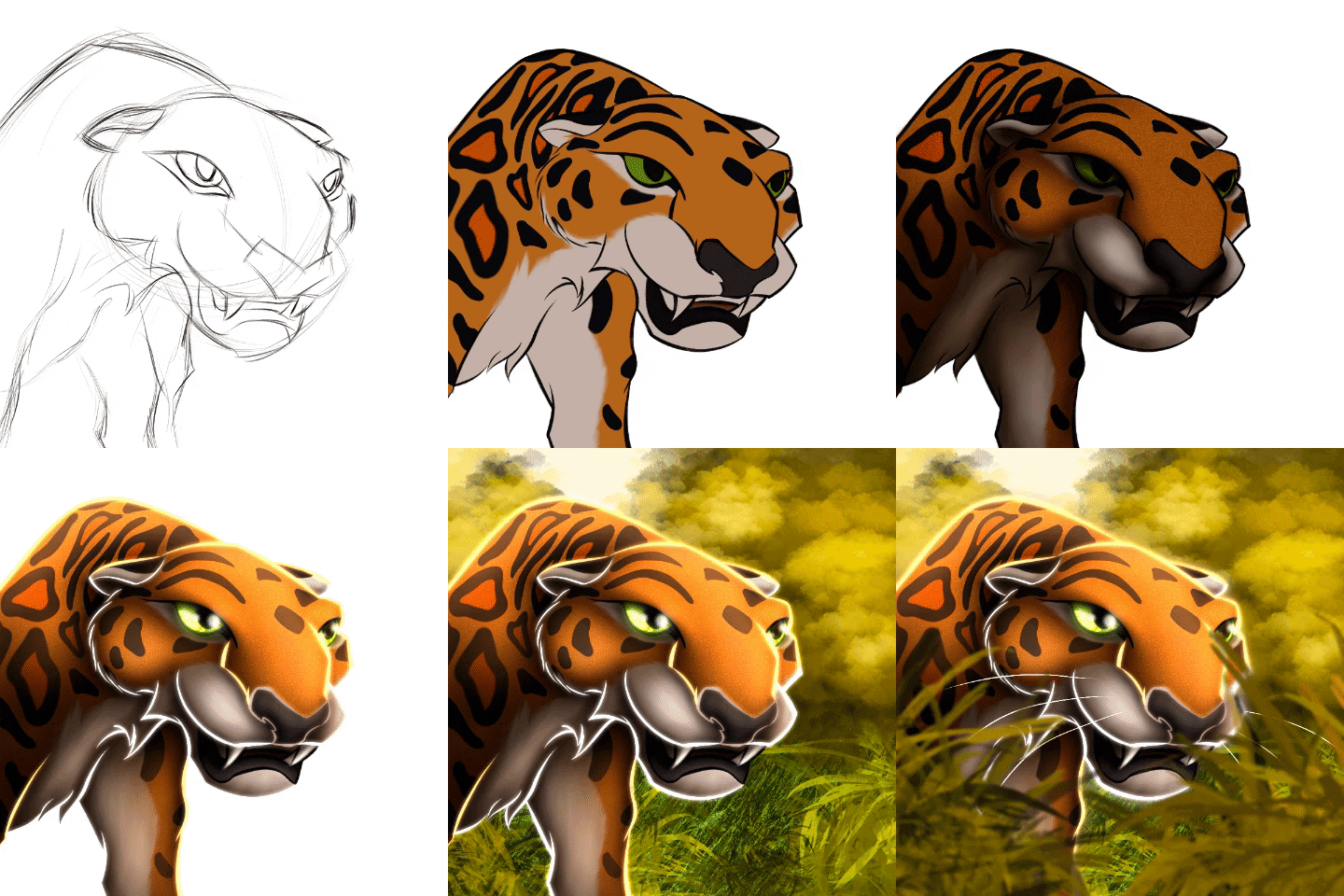
With soft and fast strokes I begin to give shape to the figure of the leopard, the head is composed of a circle, which divided by parts to give place to the eyes, nose and mouth.
Con trazos suaves y rápidos empiezo a darle forma a la figura del leopardo, la cabeza está compuesta por un círculo, la cual divido por partes para dar lugar a los ojos, nariz y boca.

Outlined / Delineado
Now I go to the delineation process, in this step as in previous drawings I separate the delineation by layers, I use one for the body and another for the eyes, nose and mouth.
Ahora paso al proceso de delineado, en este paso como en dibujos anteriores separo el delineado por capas, uso una para el cuerpo y otra para los ojos, nariz y boca.

Colour / Color
Here we add flat colors, I create a layer and paint the whole leopard in orange, then I create other layers as a cut out to add the color of the spots, eyes, mouth, nose all separately.
Acá agregamos colores planos, creo una capa y pinto todo el leopardo de un color naranja, luego voy creando otras capas a modo recorte para ir añadiendo el color de las manchas, ojos, boca, nariz todo por separado.

Shadows / Sombras
We go on to apply the shadows, I use the eyedropper tool to copy exactly the color I'm going to shade, I apply a new cut-out layer in mix-multiply mode and with the airbrush I apply those shadows, decreasing the brightness and increasing little by little the saturation of that color. In this step besides placing shadows I also add textures to the drawing.
Pasamos a aplicar las sombras, uso la herramienta gotero para copiar exactamente el color que voy a sombrear, aplico una nueva capa de recorte en modo mezcla multiplicar y con el pincel aerógrafo voy aplicando dichas sombras, disminuyendo el brillo y aumentando de a poco la saturación de dicho color. En este paso además de colocar sombras también añado texturas al dibujo.

Lights / Luces
We use the same technique of shading, but this time increasing the brightness and lowering a little saturation of the color, I create another layer of cut but this time in a mix mode add, and with the airbrush I apply the areas of light. Also in this step I like to apply a brighter color to the outline to highlight the drawing even more.
Usamos la misma técnica del sombreado, pero esta vez aumentando el brillo y bajando un poco saturación del color, creo otra capa de recorte pero esta vez en un modo de mezcla añadir, y con el pincel aerógrafo voy aplicando las zonas de luz. También en este paso me gusta aplicar un color más brillante al delineado para resaltar aún más el dibujo.

Background / Fondo
For this background I used a color palette where the predominant color is yellow, first I placed a layer under all of them and filled it with that color, then on top of it, I placed several layers of tree vegetation in the distance with different shades of yellow and in front a pasture.
Para este fondo use una paleta de colores donde el color predomínate es el amarillo, primero coloque una capa debajo de todas y la rellene con dicho color, luego arriba de esta, fui colocando varias capas de vegetación arbórea a la lejanía con diferentes tonalidades de amarillos y al frente un pastizal.

Details / Detalles
In this step add some vegetation in the foreground framing the character and blurring it a bit to achieve a focus effect on the leopard and we end up with a special touch, drawing its whiskers.
En este paso agregue en primer plano alguna vegetación enmarcando el personaje y difuminándola un poco para lograr un efecto de enfoque en la leopardo y terminamos con un toque especial, dibujando sus bigotes.
Materials / Materiales
The tools I used for the drawing were the following:
- Android tablet.
- Capacitive pen (Stylus).
- Ibis Paint X program.
- Brushes: Pencil, Airbrush, Fuzzy, Marker.
Las herramientas que use para el dibujo fueron las siguientes:
- Tableta Android.
- Lápiz Capacitivo (Stylus).
- Programa Ibis Paint X.
- Pinceles: Lapiz, Aerografo, Difumino, Rotulador.
Thanks for reading and getting here, see you in the next post.
Gracias por leer y llegar hasta aqui, nos vemos en el siguiente post.

Discipline is the power of all professionalism.
La disciplina es el poder de todo profesionalismo.