I have read many tweets, and comments on Discord too, that some people, who are new to blockchains, find it hard to Login first time after creating the account on HIVE Blockchain, sometimes even after that.
This was the problem with someone I know from my real life as well.
I have described the details about how you can create a HIVE Account for free and instantly in my previous post, you can access it by clicking the following link:
How to Get a HIVE Account for Free, Instantly & Almost Instantly
Hopefully, this tutorial would be helpful for many new HIVE Blcokchain users in this regard.

SCENARIO 1: Received/Downloaded a Backup File
When you create a HIVE Account with Hive OnBoard, and from some other ones as well, you receive or download a Backup file of Passwords & Keys.
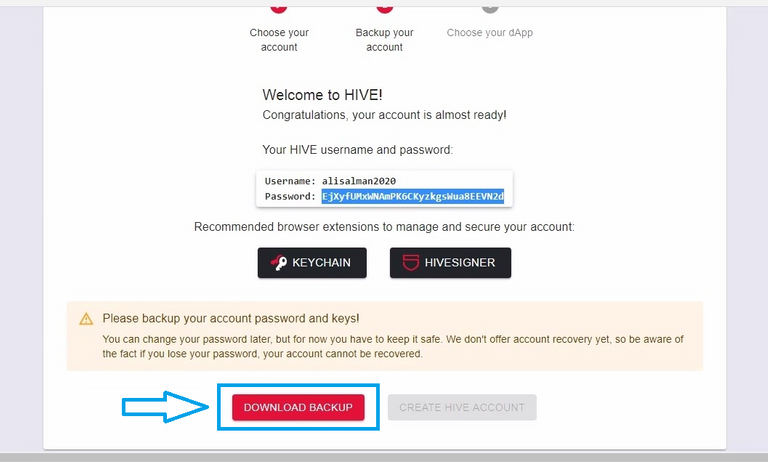
This Backup file contains USER ID, PASSWORD (MASTER PASSWORD) and PRIVATE & PUBLIC KEYS.
PRIVATE & PUBLIC each has four keys; Posting Key, Active Key, Owner Key & Memo Key.
You'll need ID, PASSWORD and PRIVATE KEYS for most of your activities on HIVE Blockchain; Posting Articles/Posts, Writing Comments, Re-blogging, Playing Games, for Staking or Powering Up HIVE, Transfer HIVE/HBD et cetera.
PRIVATE KEYS:
| Key | Description |
|---|---|
| POSTING KEY | This key is used for social activities (posting, commenting and voting). This key has a limited set of permissions and it is not able to be used for monetary actions. So you can't lose money if someone else gets access to this key. |
| ACTIVE KEY | This key has additional permissions for more sensitive monetary-related actions, like transferring and exchanging tokens. |
| OWNER KEY | The owner key is required to change the other keys. This key has additional permissions to recover your account or change your other keys. |
| MEMO KEY | The only thing the Memo Key can do is encrypt and decrypt private messages that are sent through the blockchain. |
This Short Description of each term is taken from the PEAKD's Keys & Permission Section, that can be accessed from the button, ACTIONS..., on your PEAKD's blog page.

You can also find these Descriptions and WHERE & HOW to USE them in little more dotted details on your HIVE WALLET's (Your Hive.Blog Wallet's) Keys & Permissions Section.
If you wish to do so, use the following link to access the page:
BACKUP FILE:
OK, LET'S GET BACK TO BACKUP FILE.
If you received/downloaded the backup file while creating the account and it is not organized or you don't understand how the keys are written in it, see the following GIF for the explanation and to how to organize it for the first time login and future use as well.

Keep this file somewhere safe and if possible then somewhere other than your Computer or the device you work on, better to keep it offline, but BE CAREFUL and don't loose it.
HOW TO LOGIN:
Now that you have all the KEYS, ID and PASSWORD, it's time to LOGIN.
STEPS:
- Go to HIVE.BLOG
- Click on
Loginon top, this will open the LOGIN Window. - Enter your HIVE ID, For example; alisalman2020.
- Enter
Private Posting Key. - Hit
Loginbutton.

WHAT YOU CAN DO ON HIVE.BLOG:
- Publish Posts/Articles,
- Write Comments on others' Posts/Articles,
- Re-blog others' Posts/Articles which you like and want to share with others.
- Curate or Upvote Posts/Articles & Comments.
HIVE KEYCHAIN EXTENSION:
There is another way you can use to LOGIN, and that is with HIVE KEYCHAIN, which is more secure, safe, easy and faster.
- To install HIVE Keychain Extension on Firefox browser, go to HIVE KEYCHAIN FOR FIREFOX BROWSER (shared there by stoodkev)
- Click on
Add to Firefoxbutton. - It will show you the message of what permissions HIVE KeyChain needs, Click on
Add

- To install HIVE Keychain Extension on Chrome of Brave browser, go to HIVE KEYCHAIN FOR CHROME/BRAVE BROWSERS (shared by yabapmatt)
- Click on
Add to Bravebutton. - Browser will download it and will show you the message, there click on
Add extensionbutton.
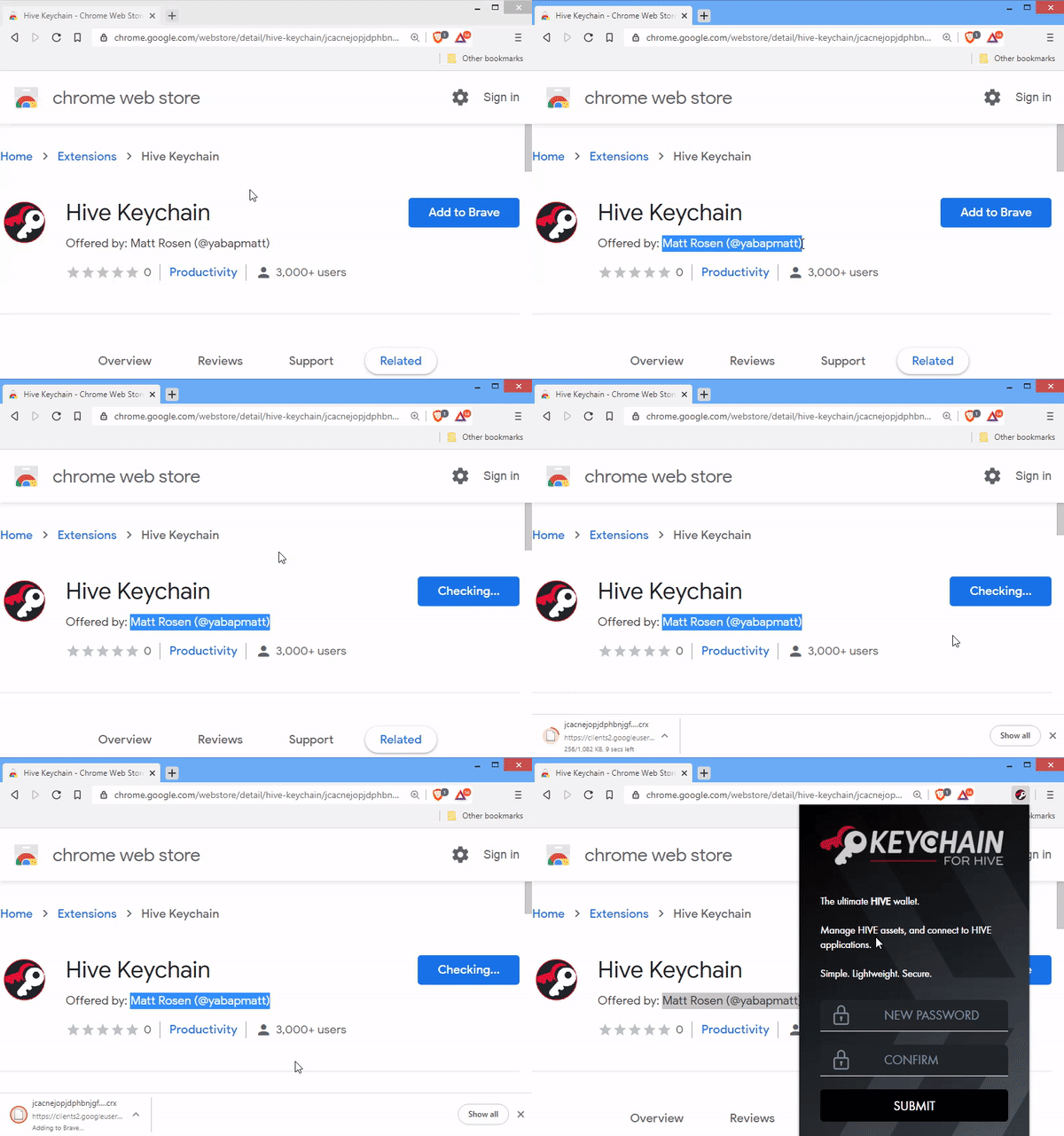
- Access the extension by clicking its symbol on the right top corner of the browser.
- Select a password (e.g: CbDv7Z2020&rpS or any simpler one, whatever you want) and confirm it in the next box. (This password has nothing to do with your HIVE Password/Master-Password).
- In order to use HIVE Keychain you have to setup your account on it. Enter your
HIVE User IDin the first box andPrivate Posting Keyin the second box.
You need to add two more Keys (ACTIVE & MEMO KEYS) in the KeyChain in order to cover the security of all your activities on the blockchain.
- Click on
SETTINGSbutton, beside lock symbol. - On SETTINGS, click on
Manage Accounts. - First enter Active Key and then Memo Key by clicking "+" sign against each of them.

HOW TO LOGIN WITH KEYCHAIN EXTENSION:
- Hive Keychain Exntension will ask you to enter the password only once when you first time open your browser on the day. This is the password you set for the extension, your HIVE Password and Keys are safe where you stored them.
- Once again open & login HIVE.BLOG, but this time with KEYCHAIN.
- Click on Login on the top.
- On the pop-up window, enter your
User ID. You'll notice that the box beforeUse Keychain Extensionis already checked and you don't need to enter any password. - Hit Login button.
- Keychain will open
Sign Message Dialogue. Check the box forDo not promt..., this will stop opening this dialogue when you login again in the future.
This Dialogue window will also open when you first time post a comment, upvote a comment and/or post, and re-blog any article. If you check the box in each dialogue window, you won't need to need to confirm each of these actions repeatedly and extension will remember your decision.

HiveSigner:
Some of the dApps and Games need you to login with HiveSigner. Most of the dApps and games on the blockchain give you both the options, but some works with only one of them, HiveSigner or HIVE KeyChain.
HOW TO LOGIN WITH HIVESIGNER:
- Click on
Loginon top of HIVE.BLOG page. - Click on
HiveSignertab (My suggestion: If both the options are available then use Hive Keychain, but for the sake of this tutorial we are using HiveSigner). - Enter your User ID & Master Password and click
Get started. - Some dApps require your
Posting Authorityto post your content on the blockchain, clickAuthorize. - In the next window, click on
Get started. (I previously experienced written "Login" instead of "Get started" there on the final window before the blog).

SCENARIO 2: Got only ID & Master Password
Creating account with some of the Hive Account Providers, you might get only User ID & Master Password.
But up until now you must have understood that that's not all that is required for all the activities on the Hive Blockchain and to use the HIVE Keychain. You need Posting, Active & Memo Keys as well.
Follow the steps described below in order to get all of the keys.
- Go to HIVE WALLET,
- Click on
Login, - Enter your
User ID, - Un-check the box before "Use the Keychain extenstion", this will show the password box, enter your
Master Password. - Click on
Loginbutton, - You are in your Hive Wallet now, click on
Keys & Permissionstab. - Here you can find all of your Private Keys; Posting, Active, Owner & Memo (See the Gif below). Save them in a file.

Rest of the procedure is similar as that of described in SCENARIO 1.
Referrences:
This post is also shared on twitter in order to extend its reach and send the benefits to new users who are more active on twitter. #posh
Nice!
Thanks a lot.
This post would be great if all new people could read it. I know it's confusing at first but this post lays it out and would make life easier for noobies to the Hive blockchain.
I couldn't agree more that's what the main reason for the careful selection of the words in the title, this might help the new users at the first stage when they try to search about login procedure on HIVE Blockchain. Rest are my hopes that they'd find it.
I would like to appreciated your great efforts in this regards and I strongly believe that It will helping the newcomers greatly.
Stay safe!
These words show that I have succeeded in achieving the purpose of writing this post, at least at the first stage. Thanks a lot.
Wish you lovely and safe days ahead.