
If you are intending to get information from Ethereum or any EVM blockchains TheGraph is a great tool. It is a decentralized service providing data subgraphs using GraphQL query language. In this tutorial, I will be showing how you can get data from Uniswap using python
You can get a clear idea of how TheGraph works in this video
In order to search and extract data, you need to install gql library in your Python environment. I will also be using Plotly and Pandas to create a bar chart of the query results so you may also need to install those libraries.
pip install gql
pip install plotly
pip install pandas
Once you have both libraries installed you can import them into your code

We extract data using this piece of code. In this example, we will be searching for the first 10 Uniswap pairs with a pool volume bigger than $10M and will store the result in the response variable. The data is fetched as JSON notation so our response variable will be a dictionary,

We then create our pandas dataframe from the response variable

This is how our dataframe looks like

We add column name, change the type of the volume column from string to float, and add a new column showing the token pairs.

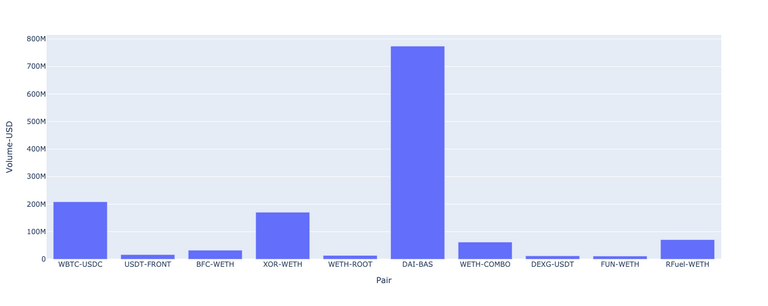
And finally, create our bar chart with these two lines of code

Here's the result
You can use this method to keep an eye on trades in a specific liquidity pool and launch a signal to decide if you want to invest.