August 15th, 2021
LibreOffice Pivot Table
I have been using and learning about LibreOffice for a few years now, and thought I would share a useful tool I only recently learned about. Last year @paulag did a post and video on Pivot tables in Excel, but I never took the time to fully check out pivot tables in LibreOffice, it just looked to complicated, and well at the time I was not tracking so much information. I should have they are a great and simple tool.
So here is a simple walk through for examining Data via LibreOffice Calc. I am tracking a few different tokens that I hold, and the spreadsheet is getting rather lengthy and I needed a way to see a quick view of different totals. Below is a shortened image of my BRO token transactions:
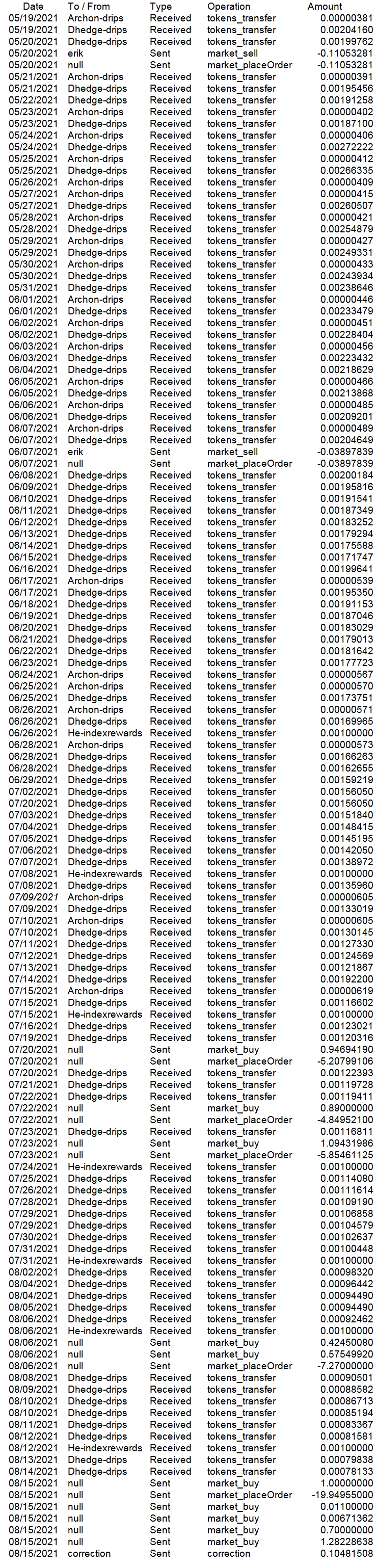
That's a lot of numbers and it has gotten to the unwieldy level for me.
First step is to open your spreadsheet of course:

Select the information you want to evaluate then under Insert tab click Pivot Table.

You get a small option box if Current Selection is not clicked, click it and then click OK.

Here is where things got a little tricky for me. After about 5 tries I got it to do what I wanted. Filters is basically - what do you want to see. I wanted to know how many tokens I owned. To get to that number I need to know how much Market transfer, and Market Buy, and of course I did not start tracking early enough so I need to know what my correction factor was.
You simply grab the fields you need from the right hand box and drag them to where they need to go. For this operation we needed the Operations Field and the Amount field.

So since the above information is in the Operations column that got dragged over to the Row Fields box also. Of course since I wanted to know the amounts Amounts got placed in the Data Fields box.
When you click OK this is the view you will get:

All the different operations in the column are shown and their individual totals. (one thing I have yet to figure out is how to keep the larger font, I have to highlight and manually change it every time).
Now I want to know how many tokens I own:

Simply click on the operations down arrow and you get the option to choose what data you want to view.

I wanted to know how many I owned so I deselect market_placeOrder and market_sell
The results:

There are a lot of ways to view and manipulate large amounts of data, I am by-far not the most technical person or spreadsheet user, but the user guide was sufficient for me to figure out how to use the Pivot table function with out having to find help via Youtube or google.

I am just here to show some support, well done on figuring out pivot table function 😄
Thanks, I know not exactly mind blowing work, but I had fun figuring it out.
I will have to admit not having followed the whole process, to my defence, I was watching a movie at the same time 😄
I am still new to trying to track stuff, never really used a ledger in my younger years, so really not sure on what to track what not to track, and more importantly how to track the financial type crap. I never really even kept up with my check book ledger when I was younger, I saw no need, I knew how much I spent, and did not care where it went. Things change, mind grows old and is not as easy to keep track of stuff in the head.
I can relate 🤣
@bashadow I find the explanation very detailed, you took great care in explaining each step, thanks for sharing it. :-)
Thank you for some things having a picture helps the explanation.
View or trade
BEER.Hey @bashadow, here is a little bit of
BEERfrom @pixresteemer for you. Enjoy it!Learn how to earn FREE BEER each day by staking your
BEER.Thank you I appreciate the support.