• Sign in
  • Sign up 
  • Welcome
  • FAQ
  • Block Explorer 
  • Night Mode
  • Stolen Accounts Recovery 
  • Change Account Password 
  • Vote for Witnesses 
  • Hive Proposals 
  • OpenHive Chat 
  • Developer Portal 
  • Hive Whitepaper 
  • Privacy Policy
  • Terms of Service
logo
  • Posts
  • Proposals
  • Witnesses
  • Our dApps
LoginSign up

How to delete temporary files to speed up internet

pinkdragon (35)in #internet • 8 years ago (edited)
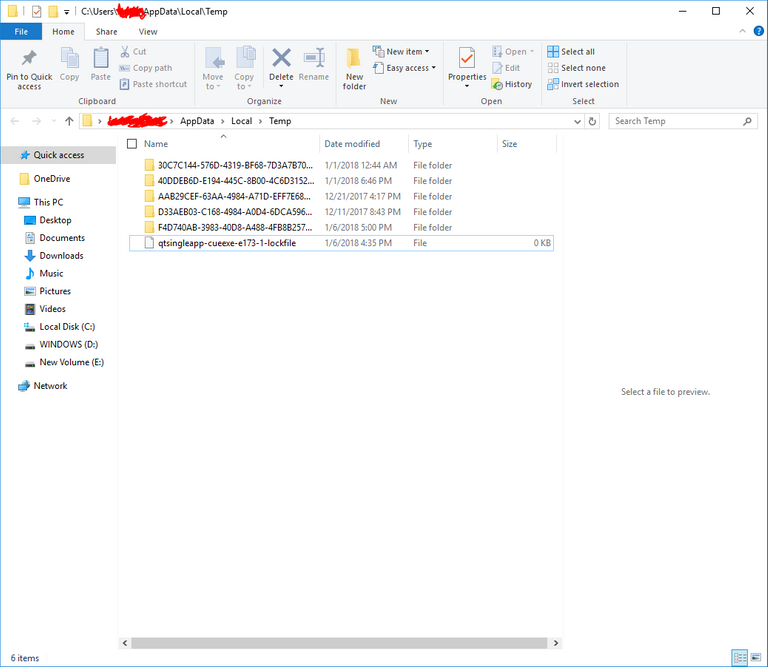
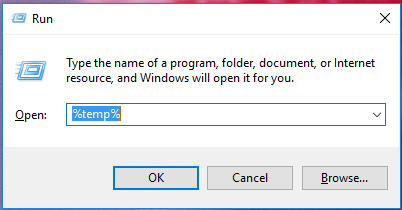
  1. Hold down Windows Key + R.Capture.PNG
  2. Type "%temp%, and click ok.Capture1.PNG
  3. Select the files and delete.

Hope this quick tutorial was a help.

#cryptocurrency #speed
8 years ago in #internet by pinkdragon (35)
$0.17
  • Past Payouts $0.17
  • - Author $0.15
  • - Curators $0.01
8 votes
  • bycz: $0.09
  • cryptotem: $0.02
  • urdawg: $0.02
  • sly2310: $0.01
  • pinkdragon: $0.01
  • cryptoaddict5: $0.01
  • nexusblocker: $0.01
  • bjarnedemeyere: $0.00
Reply 0
Sort:  
  • Trending
    • Trending
    • Votes
    • Age