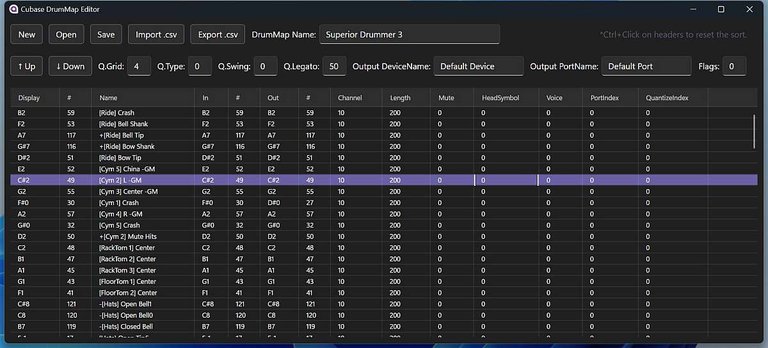
Editing drum maps inside Cubase is tedious enough that a free standalone editor is genuinely worth grabbing. Jun Murakami's Cubase DrumMap Editor (v1.5) does the whole job: New, Open, Save, plus Import.csv and Export.csv, so you can tweak a map in Excel and bring it back.
The screenshot's showing a Superior Drummer 3 map loaded in, which is exactly the use case I care about. Every row gets its own note number, channel, length, mute and head symbol settings, with per-row quantize on top. The bonus part is that he ships a bunch of ready-made maps for common drum sources, switchable inside one map.
Builds for Windows and Universal Mac are up on GitHub as a free download. If you run Cubase with drum VIs, this is one of those small tools that quietly saves you an hour a week.
Product page: https://jun-murakami.web.app/apps/cubase-drum-map-editor
The CSV import and export is the real hook here, rebuilding a drum map in a spreadsheet and dropping it back into Cubase beats clicking through every row by hand.
The spreadsheet angle sold me too, I'd honestly rather type note names than hunt them in a dropdown.