So far, HF16 has been a pretty bad release for myself. While I did successfully upgrade to HF16, I didn't do so without casualties, I missed about 4 blocks, ruining the fact that I had only missed 3 blocks since I first begun in August. This was not due to the witness going offline, no, this was due to the first problem:
Disclaimer: I'm not trying to bad mouth the developers at Steemit Inc., STEEM is a very complicated system, and I envy them for having the skills to work on it. But I'd like to get these issues out to the public so that everyone is aware.
It's very disk intensive, and any other steem-based server (or other high disk usage) running on the same physical server may cause you to miss blocks
Because of the Shared DB system, STEEM creates a large virtual memory file on disk, and uses it as a sort-of Page File. This is supposed to reduce RAM, however in some cases it doesn't actually help (more in the next section).
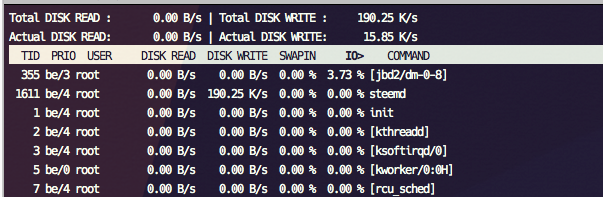
Thanks to this Shared DB system, STEEM is capable of thrashing your disk 24/7, to the point where you may be unable to run any other steem-based server on the same physical server, even if they're isolated within VMs. The optimisations given out in the release page for Linux systems don't seem to address this problem completely, and may need tuning.
I learned this lesson, as my GOLOS witness was running on one of my backup witness nodes for STEEM - this had never been an issue before, until now, thanks to the intense disk usage of HF16, my GOLOS node missed almost 200 blocks before I figured out HF16 was to blame.
Thanks to the pressure on the disk, it can cause problems for people trying to run their node on a VPS provider such as DigitalOcean or Linode, due to the disk throttling normally in place. Even for those that don't throttle, the heavy disk usage may result in you getting suspended.
Big variation in RAM usage

Above screenshot - 2 witness servers running on similar hardware, same settings.
I have servers that use 100mb of RAM, I have servers using 1.5gb of RAM, I have another server chewing up 6gb of RAM. @pharesim has a server chewing up 9gb of RAM. Despite them all being witnesses and running on similar hardware, the RAM usage cannot be predicted, it's seemingly arbitrary.
This could be the sign of a memory leak in the STEEM code, and should be addressed, as it may affect the reliability of the STEEM server over time, e.g. witnesses who need 24/7 uptime.
General random block misses
In the #witness-blocks channel, there have been more misses than ever, some people like @pharesim and @riverhead have missed seemingly hundreds of blocks on STEEM thanks to strange issues with HF16 (completely out of their control thanks to HF16, this is not shaming). I've personally missed about 5 blocks so far, and still rising, because HF16 isn't very reliable.
Server randomly stops syncing
This is a problem that should definitely be investigated. One of my STEEM nodes randomly stopped syncing, yet still believed it was supposed to be producing blocks. I'm not alone on this, some others such as @pharesim have also experienced this bug.
This problem results in missed blocks if it affects a witness node.
Thanks for this report. Various ram usage is based on OS caching and depends on how long it has been running.
It shouldn't be thrashed that much.
OS X does much better with same code. We will continue looking for ways to address Linux. In mean time using a RAM disk should fix it.
I wish I could speak this language...I feel like such a muggle :(
haha, you just posted for 99% of us!
Totally agree, sometimes we all feel like muggels.
And worse the page file is not fully pre-allocated, but increasing on the fly..
Workaround: get a machine with large RAM, put it in /dev/shm, then pray.
By the way, Steemit, Inc. has officially suggested in the blog post that node operators should tweak kernel vm parameters, which will increase the possibility of data loss for other services running in the same machine. So better use a dedicated box for Steemd if you care your data.
I have used the parameters suggested, and added them to steem-in-a-box via
./run.sh optimize, but it's far from perfect, still causes a lot of issues from the disk usage.Also the workaround is a little ridiculous, since this was supposed to reduce RAM usage...
It did reduce RAM usage if you need to run 4 steemd instances in one server, which would have consumed you 100G+ RAM with 0.15 or earlier, but with 0.16 now it needs less than 30G.
It is working alright after following suggested changes, though haven't been able to test it extensively, yet to see if node keeps running as smoothly.
nicely done!
I have a seed-node using the recommended kernel settings using about 15GB of memory out of 32. Before I restarted it last night it was at about 16GB.
I have two witness nodes at 8.6 and 8.4GB use.