Hello! A lot of people are wasting their money on prebuilt PC's that they order online or in the store. By a lot I mean A LOT of people. From my experience with building stuff, I would say building a PC is the easiest thing. I would even say that setting up a shelf from IKEA is harder..
Of course if your willing to build your own PC, you need to have some knowledge about the parts, if you don't know a single thing, either get a friend to help or pay someone to do it.
I personally have built my last 3 PC's, and I will post below some pictures of my latest one (also the specs of it)
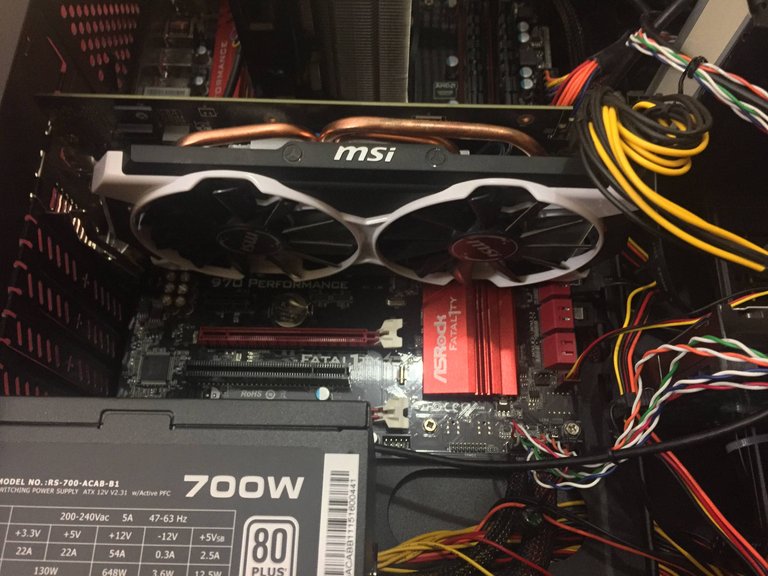

This basically was a budget build, that people would usually buy for a 1k$ or even more in stores..
Motherboard: ASROCK Fatil1ty killer 970 performance
CPU: AMD FX-8300
CPU cooler: Coolermaster EVO 210
GPU: MSI R9 380
PSU: Coolermaster 700W
Storage: Old HDD + Kingston 128GB SSD
Case: Coolermaster Knight K350
RAM: Kingston HyperX Beast 8GB 1866MHz
Pre-picking decisions
Mainly, what the user has to decide before picking all the parts is which team will he support. Either it's AMD or Intel.
There has been a lot of hassle with these two makers, and I would suggest reading enough about each company. I would go with AMD, they usually pack most of the punch for the price.
Parts
There are mainly 6-8 parts to look for in a PC build.
Sections below go in the order you should look for parts
CPU
When you have decided the team, you also have to decide for what will you using the PC. Basically I would say look in the store your going to use for the selection they have. I would say don't pick a CPU that has less then 4 cores.
GPU
This is the tricky part. The fight between the teams don't ever stop. Right now from my point of view AMD is winning , because of their new releases and upcoming releases. In AMD side, I would say any GPU that is about 200$ value, will be okay, try to look for the latest released ones of course.
Motherboard
In this part all the magic happens connecting all the stuff together. So make sure your looking at the motherboard with all the right connections for the CPU and GPU you have. Between those two, CPU would be the one who determent if the MOBO is okay for the parts.
CPU cooler
This part can be skipped if your willing to use the stock heatsink, but if not this would be the time to look into better cooling, because you have picked your MOBO and CPU. There are some releases of motherboards that have special mounts for cooling (even if the socket is the same), but that is only for Intel as far as I know.
RAM
I would suggest picking 1 or 2 modules of 8GB ram. The type depends on the MOBO, so either DDR3 or DDR4.
The frequency is not very important, but I would suggest picking 1666MHz or 1866MHz for a little boost in FPS or compressing speed.
PSU
Calculate the total power your CPU + GPU + like 50W and you will know how much power you need in your PSU. But, make sure the PSU can reach only like 80% of it's power, otherwise it can get damaged, etc.
Storage
SSD's all the way. HDD's are slow and not that much used in new builds in 2016. They are more reliable, faster, but also more expensive, but it's worth the money.
Case
Depending on your desires and budget, you can pick a case you want, just make sure you got enough clearance for the cooler if you got a new one and also the right form factor for your MOBO.
For a lot of people the looks are not that important, but I personally like if my PC is clean and looks good.
TIPS
- Keep your PC clean, inside and outside, use compressed air to blow out all the dust or just with hands try to get most of dust out. Dust in large amount can short out the circuits on the boards and also they increase the temp for components.
- While taking all the parts together, don't use excessive force on the parts.
- Don't place the parts on static surfaces when you take them out of the PC or the box. Even the anti-static plastic bag can be static from outside. Be careful
My coworker is an IT guy at work and he just built me a nice sweet computer. Awesome post dude.
DAT CPU HEATSINK "drools"
Yeah.. Keeps that CPU pretty cool :D I like it, would suggest to anyone! :)