Hello Steemians and Newbies. Here's My Simple Steps on How to add image in your Blogs! If you have much efficient ways on how to this I will be thankful if you leave your suggestion in the comment box. Thanks! XO!
1.) Click Editor

A.) Click Image Tab
B.) Make sure it's Markdown
2.) IMAGE

C.) You can see an empty bar where you can paste the URL of your Image.
3.) COPY URL IMAGE
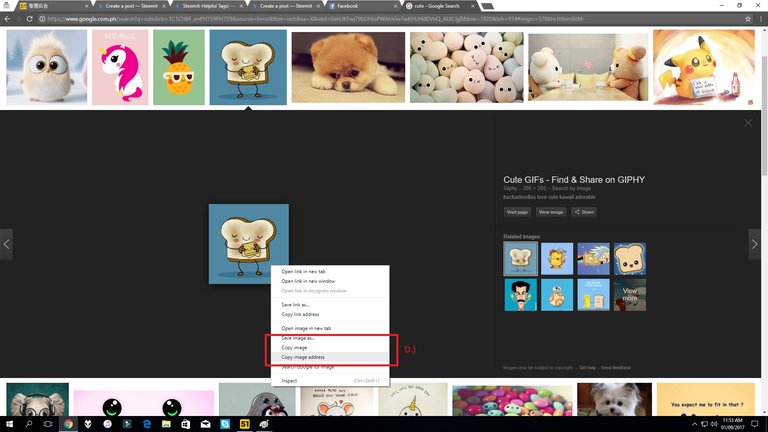
D.) Right Click and make sure to "Copy Image Address"
4.) Paste URL Image Address

E.) Paste your Image URL Address
F.) Don't Forget to Click Check!
5.) DONE!

Happy Blogging Everyone!

i usually use the select picture at the bottom. hardly uploading my picture to file hosting. . 😃
good tutorial
cool! i do that too sometimes.
Great. Thanks for sharing. I'm starting to follow you.
Followed back 🙌🏻
Thank you for this helpful tip.
I have an off-topic question regarding Steem Power that you may be able to answer; and, simultaneously help the entire community.
If I want to buy 62 cents of SP, would I put 0.62 in the amount bar? I don't want to put something that will have me owing the 'bank'. Many thanks in advance.
Peace.
0.062 is equivalent to 0.09USD
0.62 is equivalent to 0.93 USD
Thanks millions @hellolylo. I'm doing 100% of earnings for 30 days. I guess the real question is:
If I want to buy 62 cents of Steem Power, would I put 0.62 in the buy box or 0.93? This will be my very first buy...want to get it right...:+)
Many, many thanks on behalf of myself and others @hellolylo! Sounds like this might make a good post to share with newbies ;+).
Peace.
It's quite confusing too... You need to do a lot of research because the price goes up and down! I find www.coinmarketcap.com helpful when it comes to crypto coins prices.
Many thanks, hellolylo. After doing a bit more research, I finally made my first buy. I used Blocktrades, and did a little calculating :+), held my breath, and hit the transact button. All went well, without a hitch. Praise God for that.
Again, many thanks!
Peace.