
Hi, friends. on this occasion I will share the tutorial "How To Make Send Email Link Download After User Fill Forms" To be able to create features as mentioned earlier, there are 3 plugins that you must install into your wordpress. With CFORM for the form that must be filled by the user, the download plugin will contain the download link information as well as the file that will be sent via email, and the last is Email Before Download which will take over the process when the user submits the form then forwarded to integrate between plugins download by send email process. So the user only sees that the email containing the download link has been sent by the system to the download email.
1. Install CForm
Please you go into wordpress dashboard adminnya, then select the menu plugin> add new, as in the picture below:

Then will appear the search box, please fill in contact form, then select Install the Contact Form 7 that installasinya at most 1 Million Active Install, steady. Then please activate.

Then later will appear New menu in the admin dashboard ie Contact, please select Contact Forms

Then select duplicate

Please edit as you please and as necessary


Then please click save

Done, then see what we had edited, save his ID in this case I have Formnya ber id 5, please save this information

we proceed to the next stage of installing the monitor download plugin
2. Install the Download Plugin
- As always please go to add new menu in the plugin section then write download monitor, Please select download monitor (80.000 Active Install) do Install Now

Then activate
Once activated it will reappear the new menu "Download" on the dashboard, select Add New

You fill the title does not need to fill the body

On the right there is Download Option, please you select Redirect to file if the file there is a URL Dropbox / Google Drive or others,

Scroll down later you will find the + Add Files button, just click

Then please fill in under the Downloadable Files / Version Section, the download link

But if you want to send the file directly to the email can use file upload facility
Finally at the bottom there is a Short Description, just write a description of the file that will download later, I just write it like this

Then please click publish

After publish on it will appear this information

Please save the download link is ID 7
3. Installing Email Before Download Plugin
This is the last install stage plugin so please go back to plugin menu> add new then enter email before download will appear email before download with 20.000 active install please install then enable

Once activated please go to Settings menu> email before download

Part delivery format please fill Send Email

Keep dragging down to meet Email template single url, please fill in script as shown below
Click To Get Script

Then the email subjectnya on the content just like this

After that please click Save
4. Integration All of them
Okay, this is the last step of this tutorial, please make a new post ...
Then fill it like this:

Then last added
[contact-form-7 404 "Not Found"]Maybe you ask from where 7 and from 5? Please go back to the previous section on storing ID information
Please click publish

And select a preview to see the results
If it appears like this

it's because it has not been integrated with its SMTP, so you have to install one more Postman SMTP plugin

Do the installation and activate, then do post mannya settings in the menu Settings> Postman SMTP

- Then select Start The Wizard. Enter the email that is actually registered in cpanel> your email account
See the steps below:


After tested send message the result will be like picture below:

Then you can try again testing the download link via the contents formnya (Click Here), then will appear notif as shown below:

Next last please check email

Done.
Hopefully the article above is useful to all, and thanks to all of you who have read this article and put it into practice.
Thank You
Posted on Utopian.io - Rewarding Open Source Contributors
Source- https://www.ilmuwebsite.com/tutorial-wordpress-membuat-fitur-kirim-email-link-download-setelah-user-mengisi-formulir
Not indicating that the content you copy/paste is not your original work could be seen as plagiarism.
Some tips to share content and add value:
Repeated plagiarized posts are considered spam. Spam is discouraged by the community, and may result in action from the cheetah bot.
Creative Commons: If you are posting content under a Creative Commons license, please attribute and link according to the specific license. If you are posting content under CC0 or Public Domain please consider noting that at the end of your post.
If you are actually the original author, please do reply to let us know!
Thank You!
Your contribution cannot be approved yet. See the Utopian Rules.
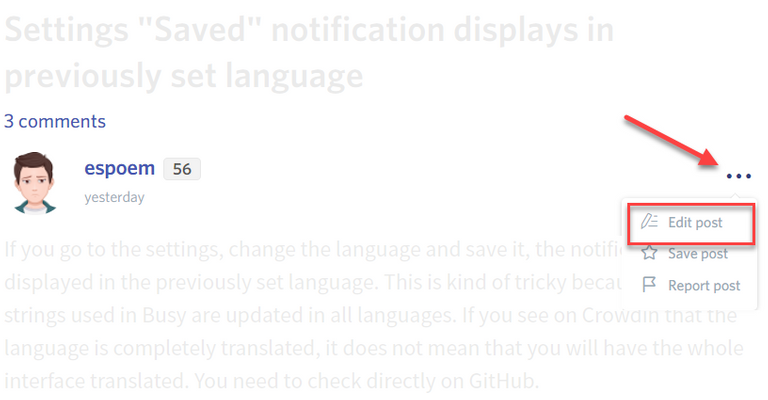
You may edit your post here, as shown below:
You can contact us on Discord.
[utopian-moderator]
Hi @damla, I have perfected my contribution. Thank
Thank you for the contribution. It has been approved.
You can contact us on Discord.
[utopian-moderator]
Hey @chintya I am @utopian-io. I have just upvoted you!
Achievements
Suggestions
Get Noticed!
Community-Driven Witness!
I am the first and only Steem Community-Driven Witness. Participate on Discord. Lets GROW TOGETHER!
Up-vote this comment to grow my power and help Open Source contributions like this one. Want to chat? Join me on Discord https://discord.gg/Pc8HG9x
Plagiarism is not allowed on Utopian, and posts that engage in plagiarism will be flagged and hidden forever.
Your account will now be banned off utopian forever. You may contact us on discord to resolve this issue.
You can contact us on Discord.
[utopian-moderator]