English Description
What is Bootstrap?
Bootstrap is actually a Framework built for Front-End Developers, but it can be used by anyone. Bootstrap is a new technology of our day, and thanks to this technology, we can build websites compatible with mobile devices as well as with all browsers. However, it has an improved appearance. Especially when an item is created in multiple colors, you can use the items in this number. In summary, thanks to different colors, it may not be necessary to add extra color with CSS. But if you are still dealing with Front-End, you will absolutely need it.
You also do not need a mobile device to test mobile compatibility, so if you narrow down the page to the corner, you narrow down the browser application from the window and the mobile interface will automatically switch to understand that the size itself is already smaller. Because of its versatility and full compatibility, your page will look the same on all mobile devices and there will be no glide problems, and you will not need to create files like "reset.css".
Including Bootstrap Files on the Site
Bootstrap's own CSS files will integrate into your HTML files. We need to place the code between the </ head> tags.
Bootstrap Benefits
The bootstrap structure is so popular and easy to use that it is the main factor in its popularity, and it has spread very quickly thanks to these two factors.
Bootstrap allows you to create websites that are compatible with devices such as phones and tablets with mobile devices like iOS, Windows Phone, Android-based devices and operating systems like Symbian, which is a level that you need to turn on without any problems with all browsers . There is nothing you need to do to provide all of these. You only need to write and compile the necessary codes. If there is any place you do not like in the CSS file thanks to Bootstrap, you can easily create your own CSS file by compiling a new CSS file from Bootstrap's official page.
Türkçe Açıklama
Bootstrap Nedir?
Bootstrap aslında Front-End Developer'lar için yaplımış bir Framework'tür ama herkes tarafından kullanabilmektedir. Bootstrap günümüzün yeni bir teknolojisidir ve bu teknoloji sayesinde mobil cihazlara, ayrıca tüm tarayıcılara uyumlu web siteleri oluşturabiliriz. Bununla beraber gelişmiş bir görünüm yapısına sahiptir. Özellikle bir öğe birden çok renkte oluşturulmuş, bu sayede hazır öğeleri kullanabilirsiniz. Özetle farklı renkıer sayesinde, ekstra olarak CSS ile renk vermenize gerek kalmayabilir. Fakat yine de Front-End ile uğraşryorsanız mutlaka ihtiyacınız olacaktır.
Ayrıca mobil uyumluluğu test edebilmeniz için mobil cihaza ihtiyacınız yok bunun için sayfayı köşelerden küçültürseniz yani pencere kısmından tarayıcı uygulamasını küçültürseniz zaten kendisi boyutlandırmanın küçüldüğünü anlayacağı için mobil arayüze otomatik olarak geçecektir. Çok çeşitliliği sayesinde ve tam uyumluluğu olduğundan sayfanız tüm mobil cihazlarda aynı şekilde gözükecektir ve kayma sorunları oluşmayacaktır, ayrıca "reset.css" gibi dosyalar oluşturmanıza gerek kalmayacaktır.
Bootstrap Dosyalarının Siteye Dahil Edilmesi
Bootstrap'ın kendi CSS dosyalarını HTML dosyamıza entegre edeceğiz. Kodları etiketleri arasına eklememiz gerekmektedir.
Kodlarımız ise aşağıdaki gibidir:
Bu CSS dosyası en son çıkmış versiyondur ve tüm yeni düzenlemeleri barındırmaktadır. Ayrıca "getbootstrap.com" adresinden güncellemeleri takip edebilirsiniz.
<link rel="stylesheet" href="https://maxcdn.bootstrapcdn.com/bootstrap/4.0.0-beta.3/css/bootstrap.min.css">

Bu dosya ise opsiyonel tema dosyasıdır ve geriye dönük uyumluluk için gereklidir.
<link rel="stylesheet" href="https://maxcdn.bootstrapcdn.com/bootstrap/4.0.0-beta.3/css/bootstrap-theme.min.css">

Bunlardan hariç birde Javascript dosyamız bulunuyor, bunu ise aşağıdaki kod ile sitenize dahil edebilirsiniz. Aynca bu kodu etiketleri arasında kullanabilirsiniz ve özellikle bu kodu son satıra ekleyerek sayfanın daha hızlı çalışmasını sağlayabilirsiniz ve bu kural Bootstrap tarafından onaylı bir kuraldır.
<script src="https://maxcdn.bootstrapcdn.com/bootstrap/4.0.0-beta.3/js/bootstrap.min.js"></script>

Sitenin mobil cihazlar için uyumlu olması ve ölçeklendirme için gerekli kod aşağıdadır. Bu kod sayesinde cihaza göre çözünürıük algılanıp 0 cihaza göre
boyutlandırma yapılacaktır.
<meta name="viewport" content="width=device-width, initial-scale-1">

Dosyaları bu şekilde projemize entegre ederek kullanıma başlayabiliriz eğer direkt aktarım istemiyor iseniz vereceğim adresten CSS dosyalarını indirip çalışmanıza yerel olarak ekleyebilirsiniz.
Yerel olarak eklemek isteyenler için:
http://netdna.bootstrapcdn.com/bootstrap/3.3.0/css/bootstrap.min.css
http://netdna.bootstrapcdn.com/bootstrap/3.3.0/css/bootstrap-theme.min.css
http://netdna.bootstrapcdn.com/bootstrap/3.3.0/js/bootstrap.min.js
adreslerinden tarayıcınız açıkken "CTRL+ S" veya "Command + S" komutu ile bilgisayarımıza indirip projenize dahil edebilirsiniz.
Bununla birlikte SASS kullanan geliştiriciler için SASS üzerinden kullanımı da bulunmaktadır. Artık bootstrap kütüphanesi sitemize dahil edilmiş durumda
tüm kodları kullanabilir ve çıktılarını alabiliriz.
Bootstrap'ın Sağladığı Kolaylıklar
Bootstrap yapısının bu kadar popüler olmasında temel etken sağladığı kolaylıklar ve kolay kullanımı olmuştur, bu iki etken sayesinde çok hızlı bir şekilde yayılmıştır.
Bootstrap sayesinde mobil cihazlara yani açmak gerekirse iOS, Windows Phone, Android tabanlı cihazlara ve bunun bir ait seviyesi olan Symbian gibi işletim sistemlerine sahip telefon ve tablet gibi aygıtlara uyumlu web siteleri oluşturmanızı sağlar, ayrıca bununla da yetinmeyip tüm tarayıcılarda sorunsuz bir biçimde, öğe bozukluğu olmadan açlıabilmesini sağlamaktadır. Bunların hepsini sağlamak için yapmanız gereken hiçbir şey yoktur. Sadece gerekli kodları yazıp derlemeniz gerekmektedir. Bootstrap sayesinde CSS dosyasında beğenmediğiniz herhangi bir yer var ise, Bootstrap'ın resmi sayfasından yeni bir CSS dosyasını derleyerek kendinize ait CSS dosyası rahatlıkla oluşturabilirsiniz.
Ayrıca bunların yanında Responsive çalışmayı daha kolay hale getirdiğini söyleyebilirim.
Düzenleme sayfası için:
http://getbootstrap.com/customize/ adresini ziyaret edebilirsiniz.
İndirme linki için: http://getbootstrap.com/getting-started/#download adresini ziyaret edebilirsiniz.
Posted on Utopian.io - Rewarding Open Source Contributors
Your contribution cannot be approved yet because it is not as informative as other contributions. See the Utopian Rules. Please edit your contribution and add try to improve the length and detail of your contribution (or add more images/mockups/screenshots), to reapply for approval.
You have to write brief information, paragraph at the start of the post such as ''How to download, what will i introduce on this post'' . You just skipped to introduction phase.
You have to add more details maybe more images.
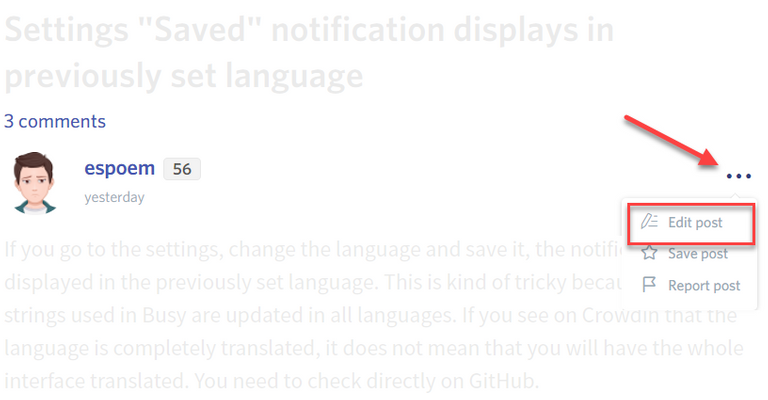
You may edit your post here, as shown below:
You can contact us on Discord.
[utopian-moderator]
Edited. Please check again?
Thank you for the contribution. It has been approved.
You can contact us on Discord.
[utopian-moderator]
Hey @enderman I am @utopian-io. I have just upvoted you!
Achievements
Suggestions
Get Noticed!
Community-Driven Witness!
I am the first and only Steem Community-Driven Witness. Participate on Discord. Lets GROW TOGETHER!
Up-vote this comment to grow my power and help Open Source contributions like this one. Want to chat? Join me on Discord https://discord.gg/Pc8HG9x