Session-based authorization
Authorisation is a problem almost every web developer needs to solve sooner or later. When backend server receives a request from a client, it needs some way of knowing what kind of actions requesting user is allowed to perform. Historically this was handled with backend sessions. Authorisation process would go like this:
- Client performs authentication (for example, sends his login/password pair to the server)
- Server checks authentication credentials. If they are correct it creates a random string (session id) and stores it in database, with a link to corresponding user. Session is set to expire after some time, so that stolen sessions can't be reused forever.
- Server then sends session id to the client.
- Client saves session id locally.
- Whenever client sends any request to the server, it attaches session id to it as well.
- When server receives request from client, it looks up session id in databases, fetches corresponding user and looks up user's permissions. Then it simply verifies that requested action is allowed for the user.
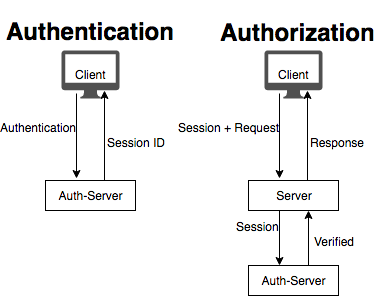
This logic is relatively simple and reasonably secure. Yet, in modern microservice-driven world, such approach creates serious amount of overhead and inconvenience, especially for heavily loaded systems. If app backend consists of multiple services, each request results in additional internal api request (to the microservice responsible for user authorisation), and then to the database itself. This problem can be somewhat mitigated by effective caching strategies and smart architectural decisions, but it can't be solved completely while backend user-session are used.
This is where JWT tokens come in.
JWT token authorization
JWT token is a signed, base64 encoded string, that contains app-specific information. Since it is signed, only the server in possession of correct secret can issue a JWT token. If this sentence does not make sense to you yet - continue reading, it will become obvious soon.
This is what JWT token normally looks like:
eyJhbGciOiJIUzI1NiIsInR5cCI6IkpXVCJ9.eyJzdWIiOiIxMjM0NTY3ODkwIiwibmFtZSI6IkpvaG4gRG9lIiwicm9sZSI6ImFkbWluIn0.jThugZMW2kWTFexGhW60Z5tZo69s1GrrZS9UgyhoI_E
It looks complicated on the first glance, but it's actually quite simple once you decode it. Let's split this string on periods, and describe each part separately.
- First part of JWT token,
eyJhbGciOiJIUzI1NiIsInR5cCI6IkpXVCJ9in our case, is called header. This is a simple base64 encoded string. It's not encrypted - anybody can decode base64. Base64 is used to simply to get rid of the special symbols that might be inconvenient in many situations (e.g. as a part of URL). When we run this string through base64 decoder we receive this string back:
{"alg":"HS256","typ":"JWT"}
As you can see, it's just a JSON object. Value of alg field is a type of algorithm used to sign the token (we'll get to it later). Value of "typ" is always "JWT".
- Second part of JWT token is
eyJzdWIiOiIxMjM0NTY3ODkwIiwibmFtZSI6IkpvaG4gRG9lIiwicm9sZSI6ImFkbWluIn0. It's called payload and this is where we store the data our application needs in the end. Let's repeat our trick and run it through Base64 decoder:
{"sub":"1234567890","name":"John Doe","role":"admin"}
We get another JSON object, which is no surprise. "sub" field is designed to describe the subject of this particular token. In our case we put user identifier in there, that can be used to fetch additional data about the user from database. We also store user's name and role in there, so we don't actually need to query database to get this specific user attributes. You might also include "exp" field in your payload to specify expiration date for the token.
- Last part of token is
WADzT0Ar1TNHqATQHDNUx7IVWEEYVteCpgaw2L8soBk. It's called signature. Signature is not a JSON object, it's binary data encoded in base64. Signature is calcualted based on 2 things:- Unsigned token itself, in our case:
eyJhbGciOiJIUzI1NiIsInR5cCI6IkpXVCJ9.eyJzdWIiOiIxMjM0NTY3ODkwIiwibmFtZSI6IkpvaG4gRG9lIiwicm9sZSI6ImFkbWluIn0 - Secret key, which you can imagine is kind of like a password. Anyone possession secret key can issue or verify JWT tokens.
- Unsigned token itself, in our case:
Since only you know the secret key - only you can create a valid signature for the JWT token. If malicious client wants to change his role to "superadmin", he can try to do so by modifying the payload part of JWT token, but without secret key he will have no way of creating correct signature, and server will immidiately spot that token is "fake".
JWT-based authorization
Thanks to the fact that it's impossible to forge JWT token, backend service can rely on information that is contained in it without any need to contact database. This simplifies the authorisation task and eliminates need to query user database on each request. Here's how full authorisation/authentication flow will look like with JWT-token:
- Client performs authentication (as before, can be login/password pair sent to the server)
- Server checks authentication credentials. If they are correct it creates a JWT token, signed with secret key. JWT token contains information about user's permission.
- Server then sends JWT token to client.
- Client saves JWT token locally.
- Whenever client sends any request to the server, it attaches JWT token to it as well.
- When server receives request from client, it verifies JWT token with secret key, which is stored locally, so there is no need to contact external database, unless server needs some additional information about the user, which is not contained inside JWT token.
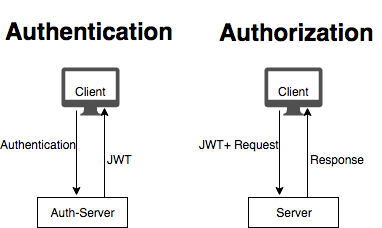
As you can see, JWT token replaces functionality session id provides, but with considerable benefits. In case of microservice architecture, possibility of transferring reliable information with JWT token means we eliminated 1 additional internal request for each incoming client request, which is great performance booster for the applications under significant load.
Posted on Utopian.io - Rewarding Open Source Contributors
Thank you for the contribution. It has been approved.
You can contact us on Discord.
[utopian-moderator]
Thanks, will keep it in mind for the future.
Hey @laxam I am @utopian-io. I have just upvoted you!
Achievements
Community-Driven Witness!
I am the first and only Steem Community-Driven Witness. Participate on Discord. Lets GROW TOGETHER!
Up-vote this comment to grow my power and help Open Source contributions like this one. Want to chat? Join me on Discord https://discord.gg/Pc8HG9x