I was trying to post on Utopian from my mobile (I find it healthier to use a mobile device than a laptop or PC. It gives freedom to move and to adopt a more comfortable body posture).

I was using Chrome browser and I could not use the "Enter" key on the mobile onscreen keyboard to select the project, because it was replaced by the "Next" key.

Maybe I could have used another keyboard or a gesture to get the "enter" key to work. It does not work on default keyboard, it just moves the cursor to the next field.

Typing the exact project name did not work either. It had to be selected from the list.
I tried from Firefox mobile browser and there the "Enter" key works fine.
This bug is on Chrome latest version 63.0.3239.107 on Android 4.4.2 Lenovo S860 Phone.
It is also present on Beta version of Chrome.

http://gfycat.com/UniqueEllipticalBluefish

Posted on Utopian.io - Rewarding Open Source Contributors
Thank you for the contribution. It has been approved.
You can contact us on Discord.
[utopian-moderator]
Thank you very much!
Your contribution cannot be approved yet. See the Utopian Rules.
Try to update your browser to the latest version if the same problem appear again try to record it on a video or using GIF and add it to your contribution because we have tried to reproduce the bug but it is working fine .
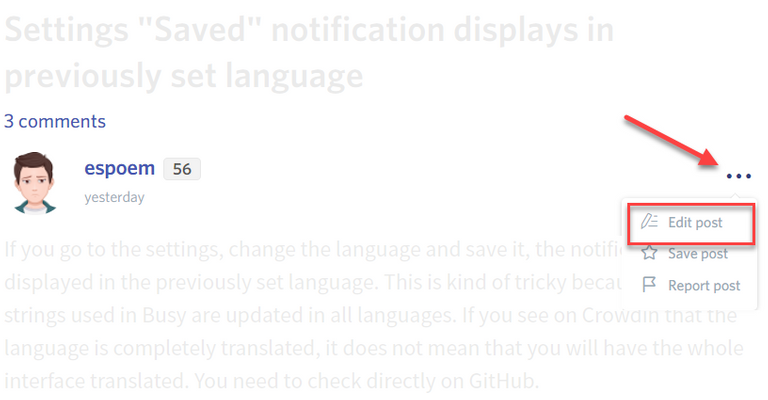
Please edit your contribution to reapply for approval.
You may edit your post here, as shown below:
You can contact us on Discord.
[utopian-moderator]
Hey @ntony I am @utopian-io. I have just upvoted you!
Achievements
Suggestions
Get Noticed!
Community-Driven Witness!
I am the first and only Steem Community-Driven Witness. Participate on Discord. Lets GROW TOGETHER!
Up-vote this comment to grow my power and help Open Source contributions like this one. Want to chat? Join me on Discord https://discord.gg/Pc8HG9x