For logrotate we create a configuration file inside /etc/logrotate.d/ directory and check if there is a logrotate file in /etc/cron.hourly/ - if not copy it from cron.daily
EXAMPLE 1: logrotate file that will only rotate a single file when its size reaches 2000MB, keep 7 files compressed and delete them after a week.
/var/log/apache2/domlogs/domain.com-ssl* {
    daily
    missingok
    notifempty
    rotate 7
    size 2000M
    maxsize 2000M
    maxage 7
    dateext
    compress
    create
}
EXAMPLE 2: Rotate all domlogs daily when they reach 200MB in size, keep 7 files rotated and delete them after a week. In this example, it is added that after rotation, httpd reload is performed, because otherwise Apache still writes to the same files after rotation.
/usr/local/apache/domlogs/* {
    daily
    missingok
    notifempty
    rotate 7
    size 200M
    maxsize 200M
    maxage 7
    dateext
    compress
    create
    sharedscripts
    postrotate
        /usr/bin/systemctl reload httpd
    endscript
}
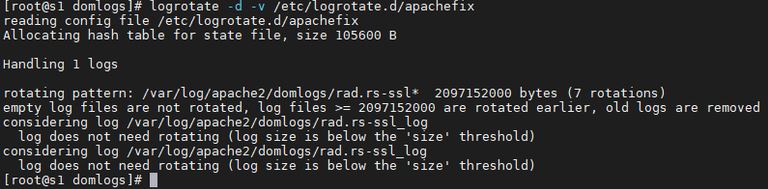
after creating a file with the configuration (see examples above), we test logrotate with the command:
logrotate -d -v /etc/logrotate.d/apachefix- apachefix is file name
- -d flag is used for dryrun - files are NOT rotated but only shown what would be rotated
- -v flag stand for verbose - writes one line at a time what is/would be rotated
You can see more about the logrotate itself as well as additional information at the following link: https://linux.die.net/man/8/logrotate