A few days ago I had to use hivesigner on my phone a lot within a short period of time and it kind of killed my afternoon. Since the keychain extension for chrome is not available on android, I was thinking about possible workarounds. To use keychain, I need a desktop browser that supports extensions. Then a question popped into my head. Can you install linux on android phones? And I immediately went to youtube with a childlike exaltation. Voila! Indeed there are many many tutorials on the subject and myriads of methods of achieving it. I’m not a programmer and pretty much a noob at linux world. So I looked through a few tutorials to see how it’s done and one of them got me excited. At that point, it was no longer about using keychain but to run linux successfully on my phone.
I should tell you beforehand, the method I used doesn’t replace your parent OS which is android, rather it uses a virtualization technique to run linux OS. Much like how you’d do it if you wanted to run linux with WSL (Windows subsystem for linux) on a windows pc.
Now, my phone is an older model with a small screen. That thing barely functions in the modern days but apart from talking to people, listening to audiobooks and music and sometimes random notification checks on hive, I don’t use that piece of antique for any other multimedia task or gaming. So I wasn’t sure whether a device with 3 gigs of ram could do it. To my surprise, it worked pretty smoothly!
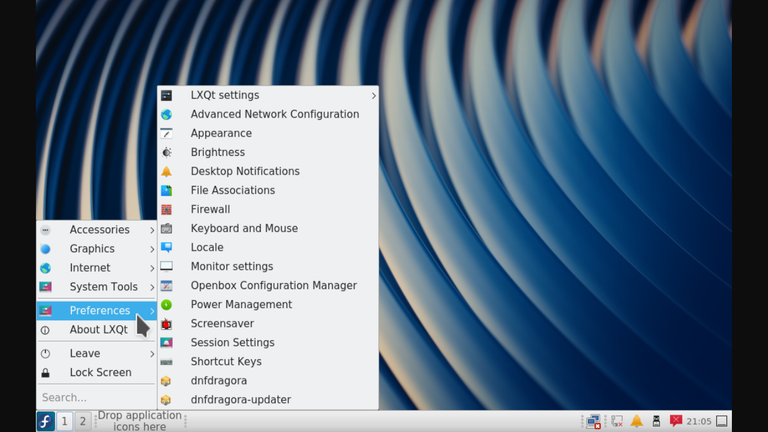
Take a look at the beautiful (or ugly) desktop of fedora with all of its glory!
In reality, I really can’t use this because of hardware limitation, both low ram and screen real-estate. So who should really do this? Why, people with powerful tabs should be able to take advantage of it. Attach a keyboard and a mouse with your tab via otg, and bam! You’ve got yourself a fully-functioning all purpose linux pc! Your oily, dusty hands should work as well.
So let me tell you how did I go about it. To make it work, you need these three apps. This is based on andronix and that app contains a few modified linux distros. You open it, select a distro of your choice and it will copy the code which contains all the necessary commands to install the OS.
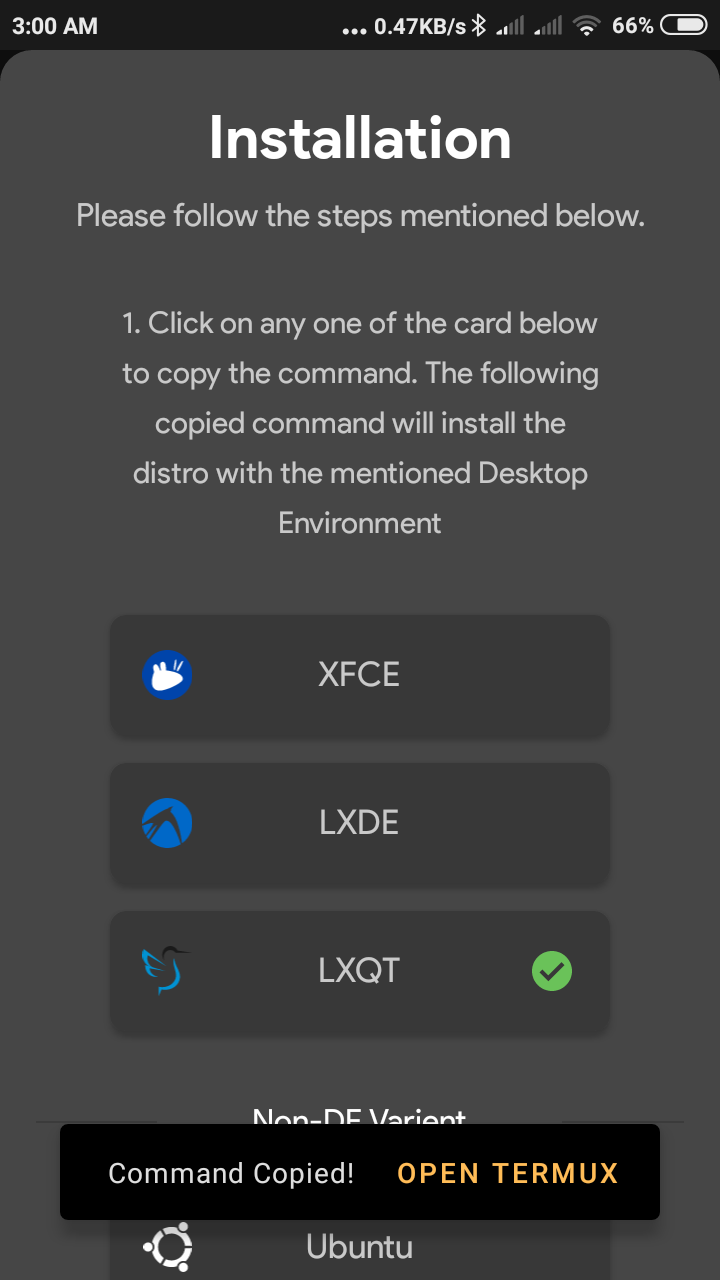
Now head over to Termux. It’s a terminal app that resembles linux terminal (clearly), paste the code onto it. Hit enter. Now, you sit back, brew some coffee, pick up a book and relax. The code will download and install the distro all by itself.

Once downloaded and installed, close termux. And reopen it. Now you can start the virtual pc.
To start it, enter this line -
./start-fedora.sh
replace ‘fedora’ with distro of your choice. If you have installed ubuntu, it should be ./start-ubuntu.sh
If it shows root and localhost that means the OS is working fine. Now you need to make it show as a desktop environment. Yes, user interfaces or GUIs are very much needed. Only nerds do not need them. We’re not nerds, are we?
To show the desktop on vncserver display, enter this onto the terminal -
vncserver-start
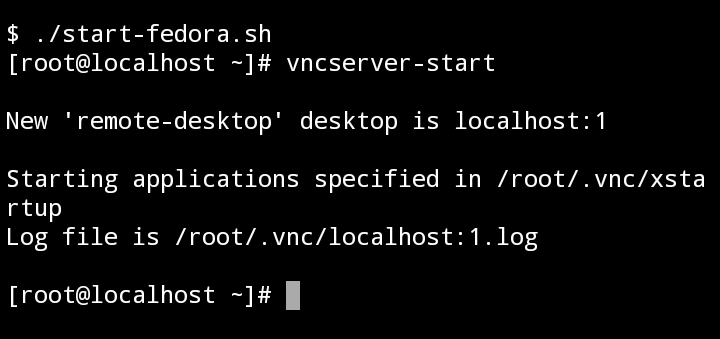
For the first time, it will ask you to set a password. You will be needing this password every time you start your virtual os.
This will also start the casting at localhost:1
We are almost done. Now open the VNC viewer app and add a server. Put localhost:1 in the address field and you can name it in any way you like.

It will ask you for the password you’ve set earlier and…That’s it! You’re on the desktop!
Pretty sweet, eh?
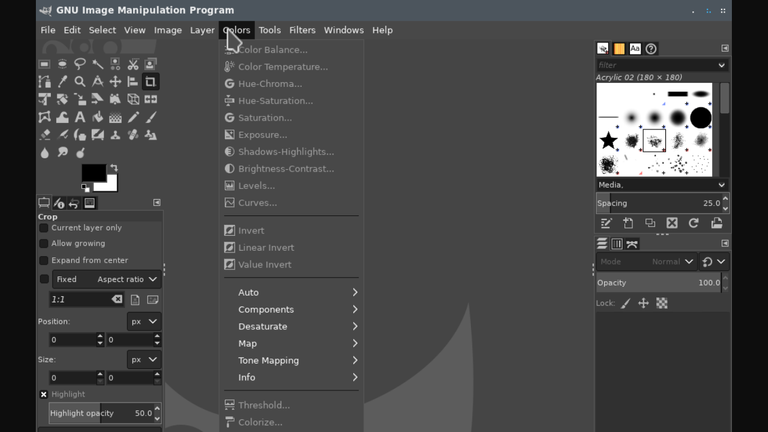
Lookie here! I have even installed Inkspace and Gimp, both design apps on the virtual linux just to prove my point. Both are working fine.
Can you believe this? I couldn’t! A full-fledged desktop environment running on my phone! Whoo!
I still haven’t tried to install keychain yet though. Haha, I actually forgot about it altogether. Now, whether I can use this setup or not, that’s irrelevant. This has been a fun experiment and a learning opportunity for me and I highly value that.
If you decide to give this a try, feel free to share your experience! I’d love to see how it worked for you. :)
Update : I also installed armbian linux on an android box. Will write on it someday.
Thanks for stopping by!
All the photos used are screenshots taken on my phone.

About Me


Twitter - https://twitter.com/not_a_c1nephile
Youtube - https://www.youtube.com/channel/UCg3TwYk--HKIsRmnvhob1Mg
Congratulations @notacinephile! You received a personal badge!
Participate in the next Power Up Day and try to power-up more HIVE to get a bigger Power-Bee.
May the Hive Power be with you!
You can view your badges on your board and compare yourself to others in the Ranking
Do not miss the last post from @hivebuzz:
Hi @notacinephile, your post has been upvoted by @bdcommunity courtesy of @rehan12!
Support us by voting as a Hive Witness and/or by delegating HIVE POWER.
JOIN US ON
Even gimp works on this!!noiceee. Is it safe for the phone tho?
Yes, of course. Doesn't overheat or anything. Pretty much smooth, there's not much lag either. I reckon this will work beautifully on more powerful hardwares.
So its just a virtual box then? Like a emulator? Sorry this hive node issues and gina being down is so bothering.. Didnt get the notification of you replying..
Gina is acting up for a few days, well, I guess we gotta give her some days off after all that hardworking!
Kind of an emulator but not exactly like the traditional ones. Emulators like VMware, Virtualbox are quite separate from the machine and usually have their own set cores and all. But WSL for Windows can use all of your system's resources. All the cores and threads at the same time. Andronix is like that.
I don't know exactly if its like that but my guess is, virtual machines like virtualbox or vmware uses two layers of systems, one is to run the machine itself and another is to emulate other OS. And WSL/Andronix runs on a single layer and on the host machine all by itself.
Im installing ubuntu btw!:p! Just to get a kick:p
Nice! It will take some to fully install. Let me know how it goes for you and how do you like it!
Looks like this post had some real effect haha!